
Morse code has historically been used for telecommunication long before the advent of modern digital systems. Even today, it remains a reliable method for low-bandwidth communication and emergency signaling where conventional networks may fail.
The User-Friendly Morse Code Decoder And Encoder project is designed to simplify both learning and practical use of Morse communication by combining encoding and decoding functionalities into a single system.
This project allows users to :
- Encode: Convert text input into Morse code signals using LED blinking, buzzer sounds, or digital output.
- Decode: Interpret Morse code input—received through button presses, sound signals, or light detection—and convert it into readable text.
By integrating microcontrollers and simple input/output components, this system provides an intuitive interface that makes Morse code communication accessible even for beginners. It is especially useful for educational purposes, emergency communication training, and electronics hobby projects.
This project also helps users understand signal processing, timing analysis, and human-machine interaction, making it an excellent hands-on application in embedded systems and communication engineering.
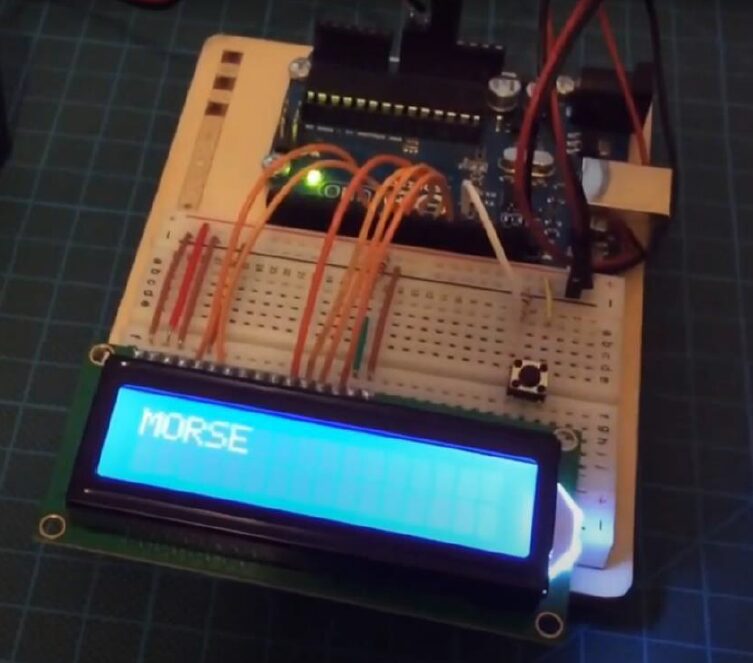
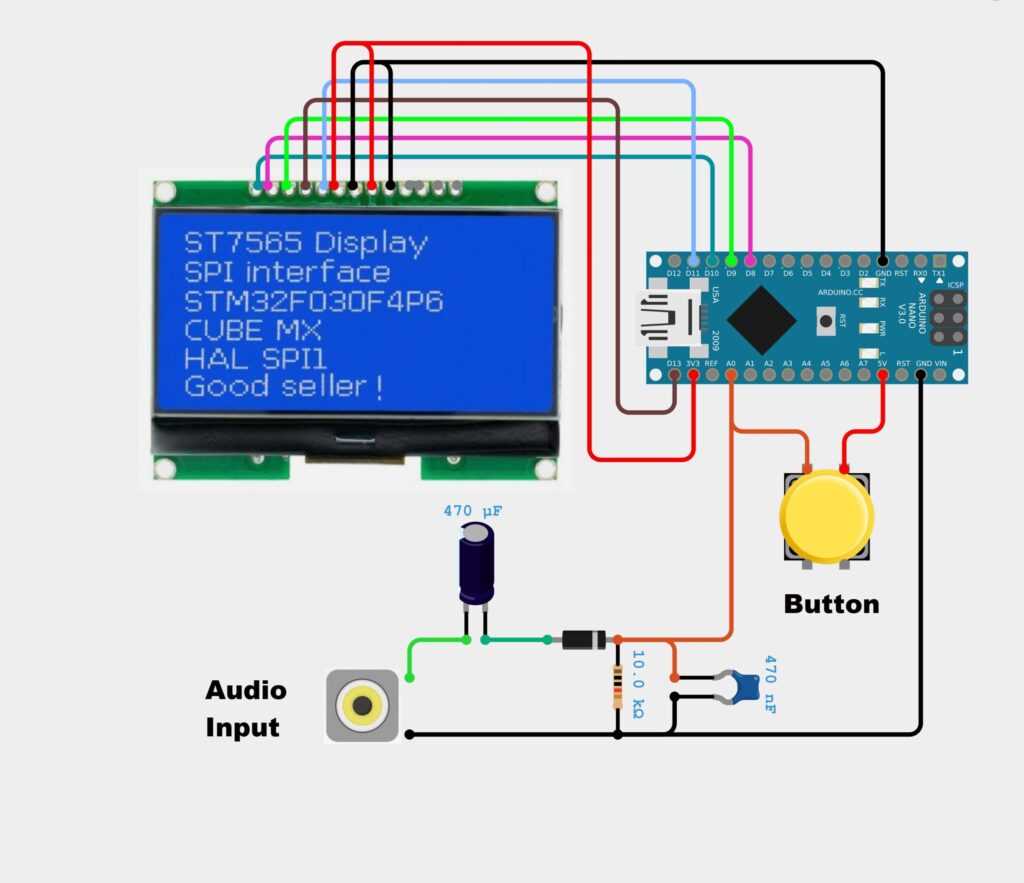
CIRCUIT DIAGRAM
Connection Description (Wiring Map) :
Main Components:
- Microcontroller: Arduino Uno / ESP32
- LED / Buzzer: Provides Morse code output
- Input Interface: Push button or serial input for Morse code or text
- LCD Display (Optional): Shows decoded or encoded text
- Power Supply: 5V regulated supply
Wiring Summary :
Component | Arduino Pin | Connection Notes |
LED | D9 | Digital output for Morse code signal |
Buzzer | D8 | Optional sound output for Morse code |
Push Button | D2 | Input for Morse code signal |
LCD Display | D4-D7 | Optional; 16×2 LCD for text display |
Power Supply | Vin & GND | 5V regulated supply |
Visual Wiring Map (Simplified) :
- Push button connected to digital input pin (with pull-down resistor)
- LED and buzzer connected to digital output pins
- LCD display connected via parallel or I2C interface
- Arduino powered through 5V regulated supply
Testing the Hardware :
- LED/Buzzer Test: Write a simple Arduino program to blink LED or buzz a few dots and dashes to verify output.
- Button Input Test: Press the button and check if Arduino detects short and long presses for dot/dash input.
- Encoder Test: Input a text message (via serial or keypad) and verify LED/buzzer output represents correct Morse code.
- Decoder Test: Input Morse code (via button presses) and verify that the corresponding text is displayed on the LCD or serial monitor.
- Integration Test: Combine encoder and decoder functions to ensure bidirectional conversion works correctly.
Applications :
- Automatic Street Light Tracking – Moves toward light source for testing or maintenance models.
- Solar Panel Cleaning Robot – Follows sunlight direction for better alignment.
- Search & Rescue (Basic Model) – Detects light signals in dark areas.
- Warehouse Guidance System – Follows light path for navigation.
- Educational STEM Projects – Used to teach sensors, LDR, and robotics concepts.
- Security & Surveillance Prototype – Tracks torch/light movement.
- Energy Optimization Models – Demonstrates light-based automation systems.
Troubleshooting :
Problem | Possible Cause | Solution |
LED/Buzzer not working | Incorrect wiring or pin assignment | Check connections and output pin in code |
Button input not detected | Improper wiring or missing pull-down | Connect pull-down resistor and test |
Incorrect Morse code output | Timing of dot/dash not calibrated | Adjust delay times in Arduino code |
LCD display shows nothing | Wiring or initialization issue | Check data pins and LCD initialization |
Encoder and decoder not synced | Logic error in code | Debug Arduino program and verify lookup tables |
( Morse code is a method of encoding text characters as sequences of dots and dashes. A Morse Code Decoder and Encoder is an electronic system that can convert normal text into Morse code and vice versa. This project is useful for communication in emergency situations, educational purposes, or hobbyist electronics projects. Using microcontrollers, input/output interfaces, and optional sound or LED signals, it demonstrates the principles of digital encoding and decoding. )