
This project demonstrates how to build a Robot Operating System using an Arduino Uno, Adafruit Motor Shield, ultrasonic sensor, and servo motor. The system is designed to navigate its environment intelligently without human intervention, showcasing the essential principles behind modern robotics and automation.
The rover moves forward automatically, continuously scanning for obstacles in its path using the ultrasonic sensor. When an obstacle is detected, the servo motor rotates the sensor to analyze both directions, and the rover decides whether to turn left or right based on which side offers more clearance. This real-time decision-making process highlights the concept of autonomous navigation and sensor-based control, similar to how systems operate under a Robotic Operating System (ROS) in more advanced robots.
By understanding this project, learners can grasp the foundational ideas of obstacle detection, motion planning, and environment awareness — all of which play a crucial role in the development of intelligent robots powered by the Robotic Operating System.
Circuit Overview :
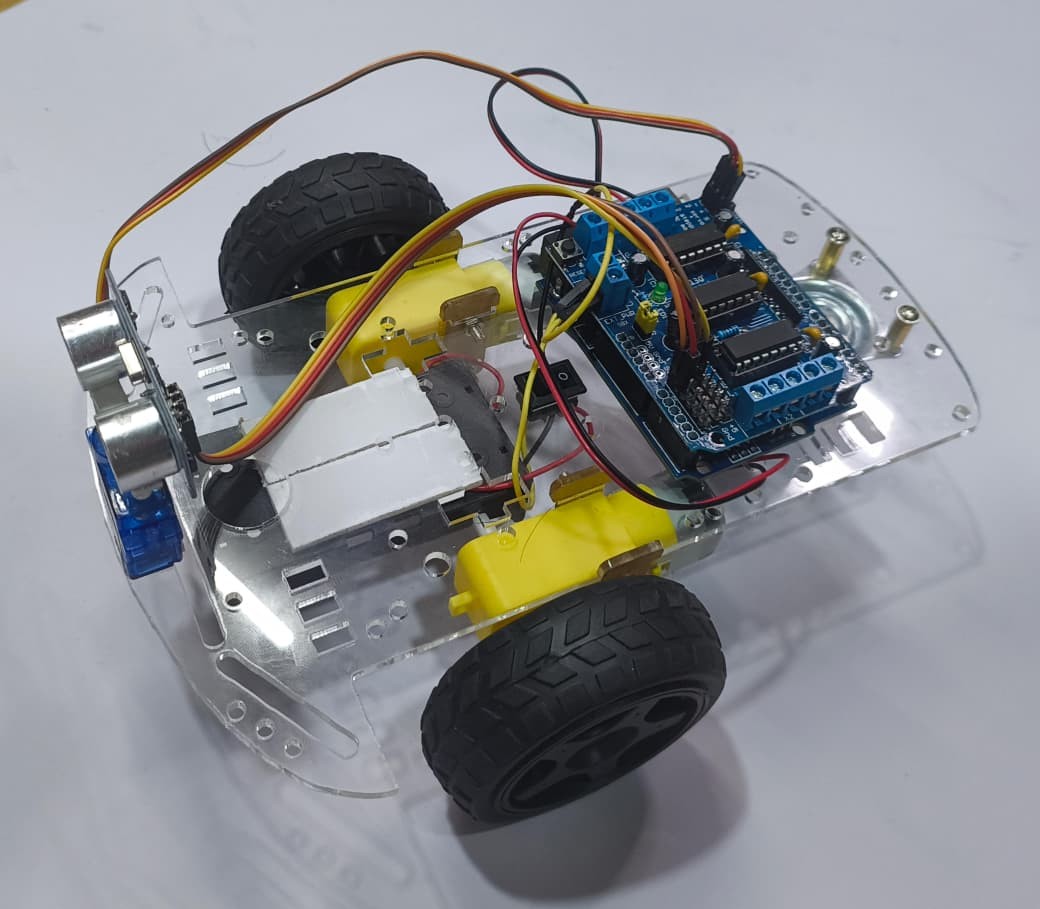
The rover uses the Adafruit Motor Shield to control the left and right DC motors. The ultrasonic sensor, mounted on a servo, scans for obstacles and sends distance readings to the Arduino.
Key idea:
When an obstacle is detected within a certain range (e.g., 15 cm), the rover reverses, turns the sensor left and right, compares the distances, and chooses the safer direction.
Applications :
While this project is primarily educational, obstacle-avoiding technology has vast real-world applications:
- Autonomous Cars – Self-driving vehicles use advanced sensors like LiDAR and radar to avoid obstacles.
- Industrial Robots – Machines in warehouses and factories navigate around equipment and workers safely.
- Delivery Drones and Rovers – Used in logistics and surveillance to move around autonomously.
- Smart Wheelchairs – Automatically avoid obstacles while moving indoors.
- Robotic Vacuum Cleaners – Navigate through furniture and rooms intelligently.
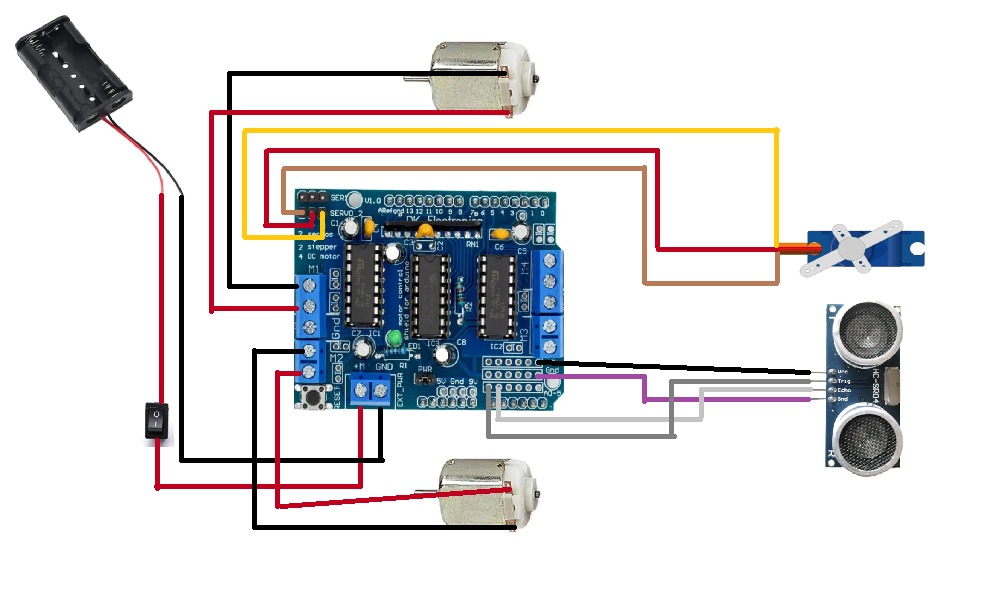
CIRCUIT DIAGRAM
Wiring the Circuit :
1. Motor Shield to Arduino
The Adafruit Motor Shield v1 directly stacks on the Arduino Uno, so most pin connections are made automatically.
Power:
Connect a 6–12 V battery pack to the VIN and GND terminals on the shield.
This supplies power to the motors (the Arduino can be powered via USB or the same battery).
2. DC Motors
Motor | Motor Shield Port | Wires |
Left Motor | M1 | Red & Black |
Right Motor | M2 | Red & Black |
3. Servo Motor
Servo Wire | Motor Shield Port | Description |
Red | SERVO_2 + | Power |
Brown/Black | SERVO_2 – | Ground |
Yellow/White | SERVO_2 s | Signal |
( This servo rotates the ultrasonic sensor left and right for distance scanning. )
4. Ultrasonic Sensor (HC-SR04)
Sensor Pin | Arduino Pin | Description |
VCC | 5V | Power |
GND | GND | Ground |
Trig | A0 | Trigger pulse |
Echo | A1 | Echo signal |
Test the Hardware :
- Power on the Arduino and motor shield.
- Open the Serial Monitor (9600 bps).
- Observe the distance readings and rover movements.
- Place obstacles in front of the rover — it should back up, scan, and choose a direction.
- Adjust motor speeds or distance threshold if needed
Trouble shooting :
Problem | Possible Cause | Solution |
Motors not running | Power supply issue | Ensure 6–12 V connected to VIN on motor shield |
Servo jittering | Power instability | Use separate supply for servo or capacitor across 5V and GND |
Wrong turn direction | Motor wiring reversed | Swap red/black wires |
No distance readings | Wrong Trig/Echo pins | Recheck A0 & A1 connections |
Learn and Build with ROS :
Whether you’re a beginner exploring robotics or a developer building advanced automation systems, ROS is the foundation that enables you to turn ideas into working robots.
Our platform offers:
Hands-on tutorials and projects using ROS
ROS installation and setup guidance
Integration with Arduino, Raspberry Pi, and other controllers
Real-world robotic applications and code examples
Get Started Today :
Unlock the potential of robotics with Robot Operating System (ROS).
Join the open-source community, start building intelligent robots, and take your innovation to the next level.
( The Obstacle Avoiding Rover is an intelligent mobile robot that uses an Arduino Uno, Adafruit Motor Shield, servo-mounted ultrasonic sensor, and DC motors to achieve autonomous navigation. The rover continuously moves forward while detecting obstacles in real time using its ultrasonic sensor. When an obstacle is detected, the servo scans both left and right directions to determine the safer path. Based on the sensor readings, the rover executes a turn and then resumes forward motion smoothly.
This project demonstrates a basic yet effective approach to autonomous navigation and sensor-based decision-making, forming the foundation of how advanced robots function under a Robotic Operating System (ROS). It’s an ideal project for beginners who want to understand the core principles of obstacle detection, environment mapping, and real-time robotic control — key components in modern robotics and automation. )