
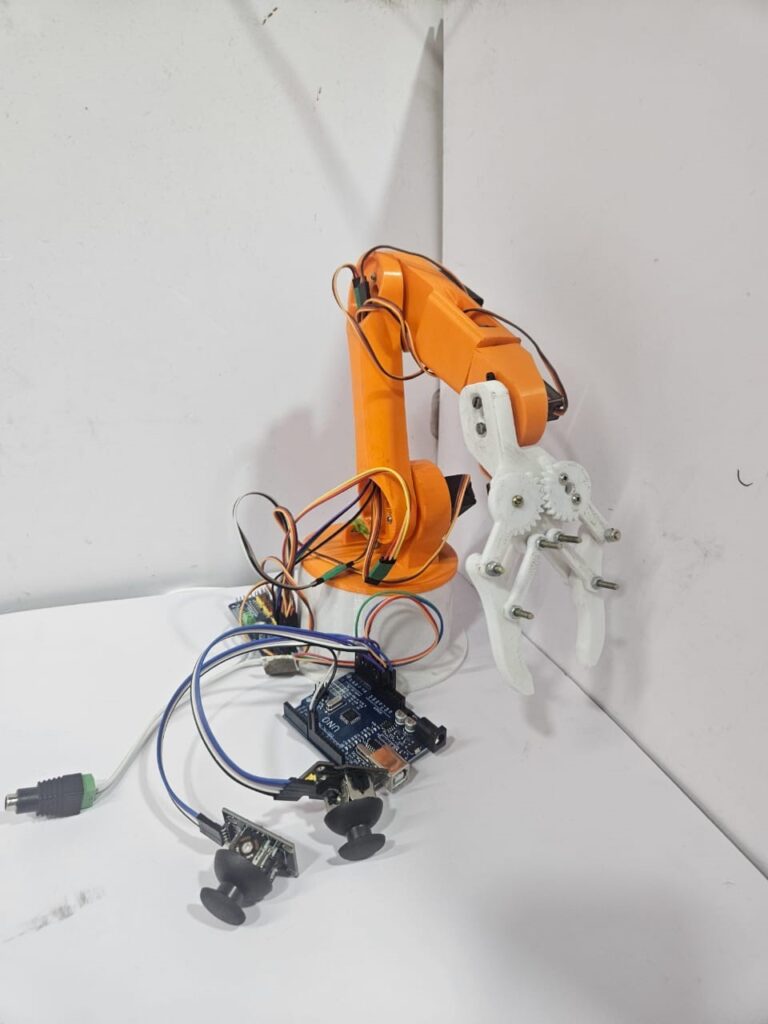
The Robotic Arm Science Project is one of the most fascinating applications in the field of robotics and automation. Robotic arms are among the most important automation tools in modern engineering and manufacturing, designed to mimic the motion of a human hand for tasks such as material handling, welding, painting, and precision assembly.
This project demonstrates a low-cost robotic arm prototype built using an Arduino Uno, two analog joysticks, and multiple servo motors. Each servo motor represents a joint of the arm and is controlled through a PCA9685 servo driver module, which provides stable PWM signals and offloads timing from the Arduino for smoother and more precise motion.
The two joysticks allow intuitive manual control — one managing the base and shoulder movements, and the other handling the wrist and gripper operations. By pressing the joystick buttons, users can switch between multiple control modes, enabling all six degrees of freedom (6 DOF) using only two joysticks.
This Robotic Arm Science Project not only introduces students and hobbyists to the fundamentals of motion control and servo operation but also demonstrates how automation principles can be applied to real-world industrial applications.
Circuit Description :
Main Components :
Arduino Uno – main controller that reads joystick inputs and sends PWM commands.
PCA9685 Servo Driver (16-channel) – provides 12-bit PWM signals to all servos.
Servo Motors (6 Nos.) – control the Base, Shoulder, Elbow, Wrist, Wrist Rotation, and Gripper.
Two Joysticks – each provides X-axis, Y-axis, and a push button input.
External Power Supply (5–6 V, ≥2 A) – powers the servo motors
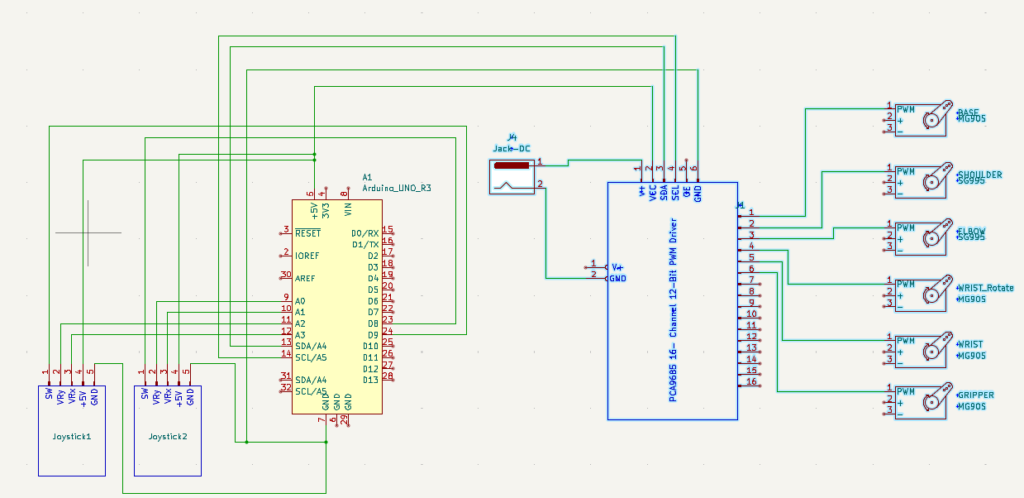
CIRCUIT DIAGRAM
Testing the Hardware :
Upload the Code: Load the final Arduino sketch onto the board.
Power the System: Connect 5–6 V supply to the PCA9685 servo power pins (V+ and GND).
Initial Check:
Each servo should move slightly to its neutral (centered) position.
Both joysticks should read around mid-values (~512).
Test Joystick 1:
Move X-axis → Base rotates left/right.
Move Y-axis → Shoulder moves up/down.
Press joystick 1 button → Mode toggles to elbow control (any direction moves elbow).
Press again → returns to base/shoulder mode.
Test Joystick 2:
Move X-axis → Wrist rotation.
Move Y-axis → Wrist bend.
Press joystick 2 button → Mode toggles to gripper control (Y-axis opens/closes gripper within 90°).
Observe Motion:
Each servo should move smoothly and stay at its last position when joystick is released.
Troubleshooting :
Problem | Possible Cause | Solution |
Servos jitter randomly | Floating analog pins or noisy power | Ensure all joystick grounds are connected; add 0.1 µF capacitor near joystick VCC–GND |
Servos not moving | Wrong PCA9685 I2C connection or no power | Check SDA (A4), SCL (A5), and 5–6 V supply to V+ |
Joystick controls reversed | Joystick physically flipped | Swap VRx/VRy connections or reverse map direction in code |
Gripper not responding | Button not toggling mode | Verify joystick 2 button connected to D9 with INPUT_PULLUP |
Arduino resets when servos move | Power supply too weak | Use separate 5–6 V, 2 A or higher supply for servos |
Only one joystick works | Loose ground or analog pin issue | Check all 5 V and GND lines; verify A0–A3 wiring |
( This project presents the design and implementation of a 6-DOF (Degree of Freedom) robotic arm controlled using two analog joysticks and an Arduino Uno. Each joystick controls multiple axes of the arm, allowing smooth, human-like motion. The system uses an Adafruit 16-channel servo driver (PCA9685) to control six servos for the base, shoulder, elbow, wrist, wrist rotation, and gripper. Joystick buttons enable switching between control modes (e.g., base/shoulder ↔ elbow, wrist/wrist rotation ↔ gripper). Incremental control logic ensures precise movement, and servo positions are retained when the joystick is released. The arm can perform object gripping, rotation, and positioning tasks with high accuracy and user control. )