
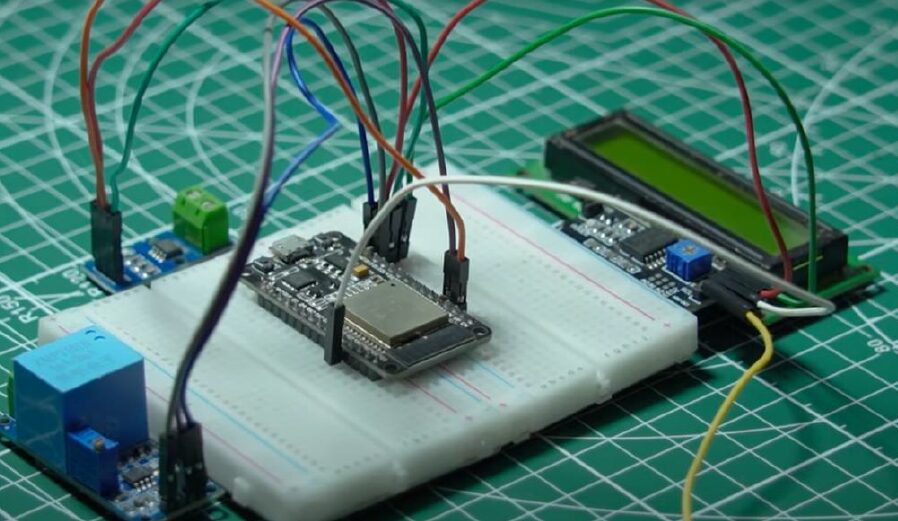
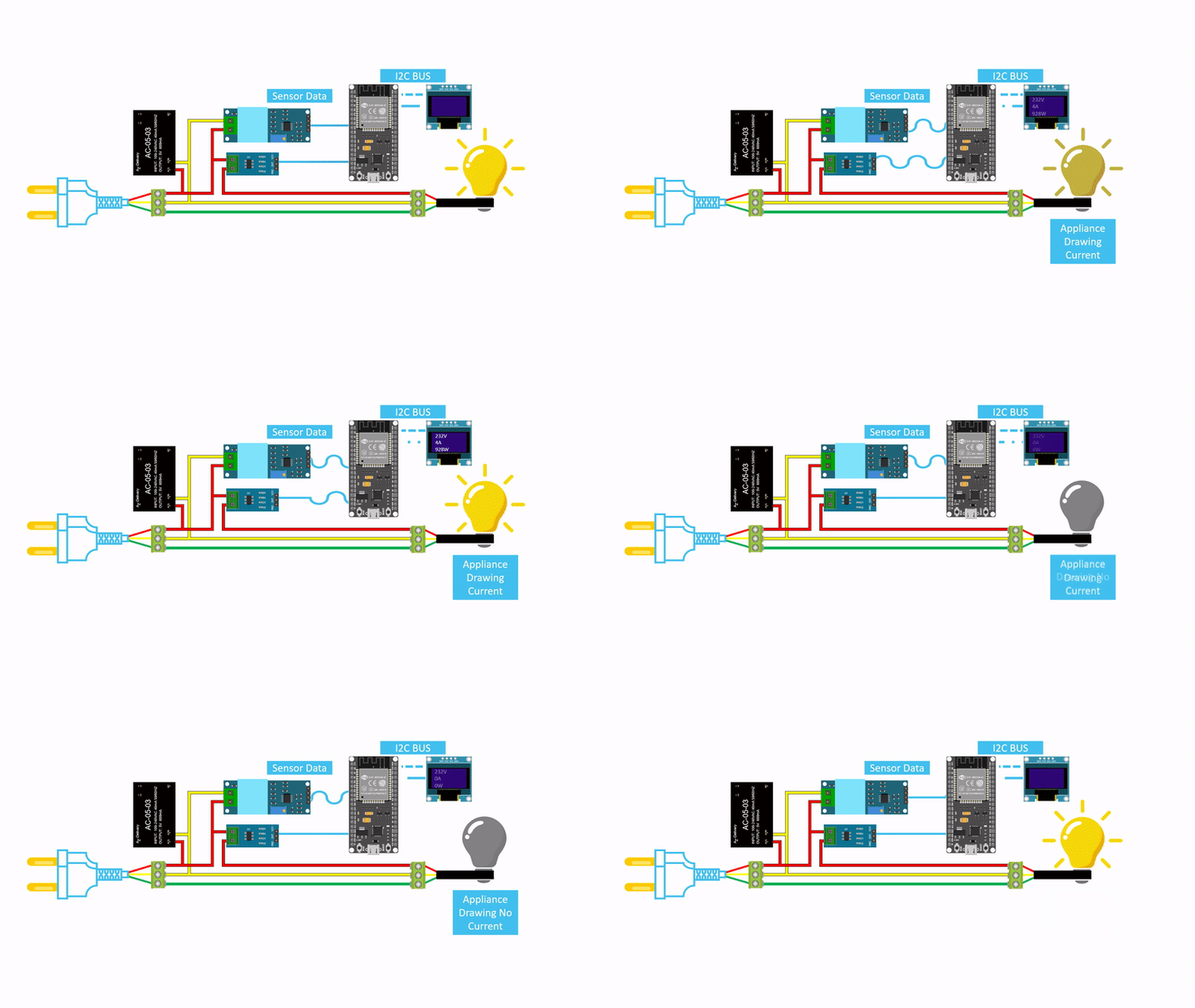
CIRCUIT DIAGRAM
Energy conservation is a global necessity, and accurate energy measurement plays a crucial role in efficient billing, monitoring, and reducing electricity wastage. Traditional electromechanical energy meters are often bulky, less accurate, and not suitable for modern smart applications.
As part of a Creative Software Project, the Smart AC Energy Meter using a microcontroller offers a more advanced and flexible solution. This system measures electrical parameters such as voltage, current, and power consumption, and converts them into precise digital readings.
Key Features :
Measures voltage, current, and calculates real power.
Computes energy consumption in kWh.
Displays readings on an LCD or 7-segment display.
Optional features include IoT integration, load monitoring, and peak demand alerts.
This project combines power electronics, sensor interfacing, and embedded programming to create a modern energy measurement solution.
Connection Description (Wiring Map) :
The hardware of an AC Energy Meter typically includes:
- Microcontroller: Arduino Uno or ESP32 – the brain of the system.
- Current Sensor: ACS712 or CT (Current Transformer) – measures AC current.
- Voltage Sensor: ZMPT101B or resistive voltage divider – measures AC voltage.
- LCD Display: 16×2 or OLED – shows real-time voltage, current, and energy.
- Power Supply: Step-down transformer or regulated DC supply for the microcontroller.
Wiring Summary:
Component | Arduino Pin | Connection Notes |
ACS712 Sensor | A0 | Analog output for current measurement |
ZMPT101B | A1 | Analog output for voltage measurement |
LCD Display | D2-D7 | Data pins; use I2C if available |
Power Supply | Vin & GND | 5V or 12V regulated supply |
Visual Wiring Map:
- Voltage sensor connected across the AC load (through isolation for safety)
- Current sensor connected in series with the load
- Sensors connected to analog input pins on Arduino
- LCD connected to display data
Testing the Hardware :
Before integrating the complete system, test each module individually:
- Voltage Sensor Test: Measure a known AC voltage and check if Arduino reads the correct value.
- Current Sensor Test: Pass a known current through the sensor and verify analog readings.
- LCD Display Test: Display test values to ensure proper data visualization.
- Integration Test: Combine voltage and current readings to calculate real-time power:
P=V×I×Power Factor (if needed)P = V \times I \times \text{Power Factor (if needed)}P=V×I×Power Factor (if needed) - Energy Calculation Test: Integrate power over time to calculate energy consumption in kWh.
Troubleshooting :
Common problems and solutions:
Problem | Possible Cause | Solution |
LCD not displaying | Incorrect wiring or contrast setting | Check connections and adjust contrast |
Incorrect voltage readings | Sensor miscalibration | Calibrate the voltage sensor |
Incorrect current readings | Sensor alignment or offset issue | Re-calibrate the ACS712 or CT sensor |
Energy readings are not updating | Software integration error | Check the power calculation algorithm |
System resets under load | Insufficient power supply | Use proper regulated supply |
( An AC Energy Meter is an electronic device designed to measure the amount of electrical energy consumed by a load connected to an alternating current (AC) supply. It calculates energy consumption in terms of kilowatt-hours (kWh) by continuously measuring voltage, current, and the power factor of the load using principles based on AC power measurement.
The system typically consists of voltage and current sensors (such as potential transformers and current transformers), a microcontroller (like Arduino, ESP32, or PIC), and a display unit such as an LCD or OLED. The sensors capture real-time electrical parameters, which are then processed by the microcontroller to compute power and total energy consumption accurately.
Modern AC energy meter projects often use specialized energy metering ICs like ADE7757 or similar modules to improve precision and simplify calculations. The measured data can be displayed in real time and optionally stored for future analysis.
Additional features can include wireless data transmission using IoT platforms, enabling users to monitor electricity usage remotely through mobile apps or web dashboards. The system can also be programmed to send alerts for overconsumption, detect abnormal power usage, or even control loads automatically to improve energy efficiency.
This project is highly useful for homes, offices, and industrial environments, helping users track energy usage, reduce electricity bills, and promote efficient power management. With further enhancements, it can be integrated into smart grid systems, prepaid billing systems, and automated energy-saving solutions. )