
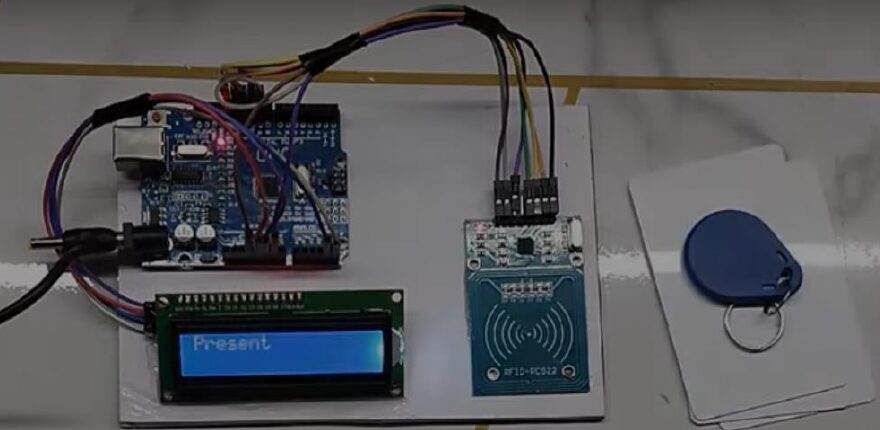
Traditional attendance systems rely on manual record-keeping, which is time-consuming, inefficient, and prone to human errors. Maintaining accurate records in such systems can be challenging, especially in schools, offices, and large organizations.
Among Innovative Sensor Project Ideas, the RFID Attendance System offers a smart and automated solution to this problem. This system uses Radio Frequency Identification (RFID) technology to detect and identify users through RFID cards or tags.
When a user brings an RFID card near the reader, the system instantly captures the unique ID and logs the attendance electronically. This process eliminates the need for manual entry, reduces errors, and significantly improves efficiency.
The system provides several advantages :
Fast and contactless attendance recording
Accurate and reliable data logging
Reduced human effort and paperwork
Easy integration with databases and management systems
Connection Description (Wiring Map)
Main Components :
Microcontroller: Arduino Uno / ESP32
RFID Reader (RC522 / similar): Reads RFID tags/cards
RFID Tags/Cards: Unique identification for each user
LCD Display (16×2 or OLED): Displays attendance confirmation
Buzzer / LED (Optional): Provides an alert on successful scan
Power Supply: 5V regulated DC
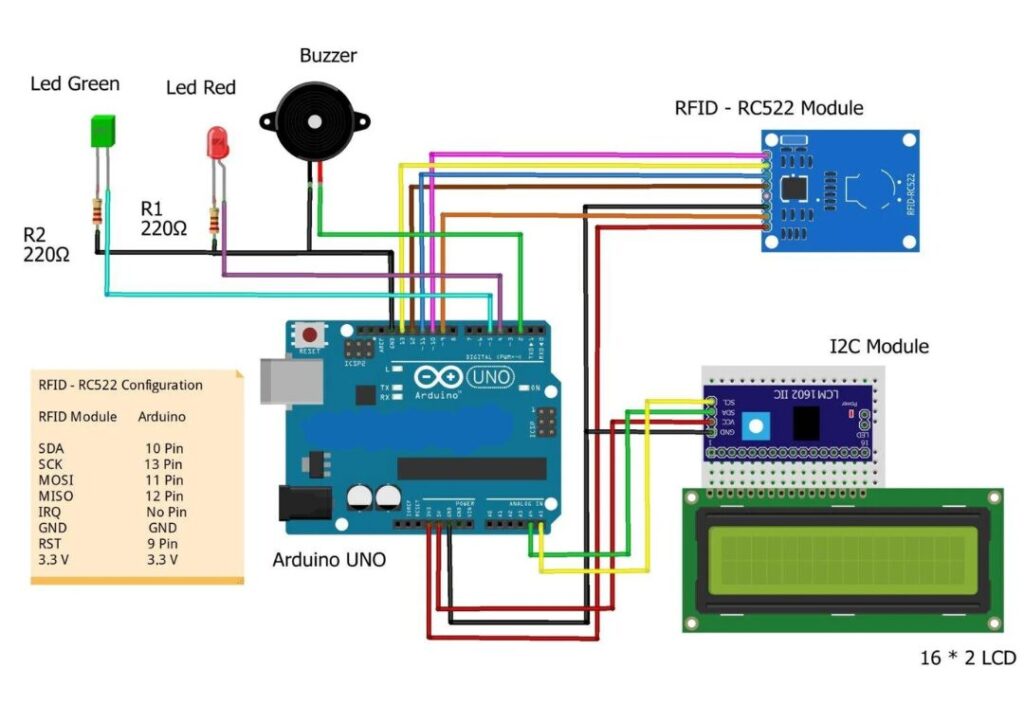
CIRCUIT DIAGRAM
Wiring Summary :
Component | Arduino Pin | Connection Notes |
RFID Reader RC522 | SDA → D10, SCK → D13, MOSI → D11, MISO → D12, RST → D9 | SPI communication with Arduino |
LCD Display | D2-D7 | Data pins; I2C variant optional |
Buzzer / LED | D8 | Optional feedback for scan confirmation |
Power Supply | 5V & GND | Powers Arduino, RFID reader, and peripherals |
Visual Wiring Map (Simplified) :
RFID Reader connected to Arduino via SPI (SDA, SCK, MOSI, MISO, RST)
LCD connected for attendance feedback
Optional buzzer or LED connected to digital output pin
( Arduino powered via regulated 5V supply )
Testing the Hardware :
RFID Reader Test: Scan an RFID card/tag and verify that Arduino detects its unique ID.
LCD Display Test: Display the scanned ID or user name on the LCD.
Buzzer/LED Test (Optional): Trigger feedback on successful scan.
Integration Test: Scan multiple RFID cards and ensure correct logging and display of attendance.
Troubleshooting :
Problem | Possible Cause | Solution |
RFID reader not detecting card | Incorrect wiring or SPI pins mismatch | Check SPI connections and pin configuration |
LCD not displaying data | Wiring or initialization issue | Verify LCD connections and code initialization |
Buzzer/LED not working | Pin connection or insufficient current | Check wiring, use transistor if needed |
Arduino not powered properly | Low voltage or unstable supply | Use regulated 5V supply |
Duplicate entries | Code logic issue | Implement proper ID checking and timestamp logging |
( The RFID Attendance System is an automated and efficient method for recording attendance using Radio Frequency Identification technology. Instead of relying on manual attendance marking, the system uses RFID tags or cards assigned to each individual, enabling quick and contactless identification.
The system consists of an RFID reader, RFID tags/cards, a microcontroller (such as Arduino or ESP32), and a display or database system. When a user places their RFID card near the reader, the system reads the unique identification number stored in the tag and verifies it with a pre-stored database. Once authenticated, the attendance is automatically recorded along with the date and time.
This system can be further enhanced with additional features such as LCD or OLED display for instant feedback, buzzer alerts for successful or failed scans, and integration with software platforms for real-time data storage and monitoring. It can also be connected to cloud systems or web applications to allow administrators to access attendance records remotely.
The RFID Attendance System significantly reduces human errors, prevents proxy attendance, and saves time compared to traditional methods. It is widely used in schools, colleges, offices, and organizations for efficient attendance management.
With further improvements, the system can be integrated with biometric verification, mobile notifications, and analytics dashboards to provide insights such as attendance trends and reports. )