
Animal intrusion into farms, highways, and residential areas can cause accidents, crop damage, and serious safety risks. Traditional monitoring systems require continuous human supervision, which is both inefficient and time-consuming.
Among the best image processing projects, Animal Detection using YOLO stands out as an innovative and practical solution to this problem. YOLO (You Only Look Once) is a powerful deep learning-based object detection algorithm capable of identifying multiple objects in real-time with high accuracy. Unlike older methods such as R-CNN, YOLO processes the entire image in a single pass through a neural network, making it extremely fast and efficient.
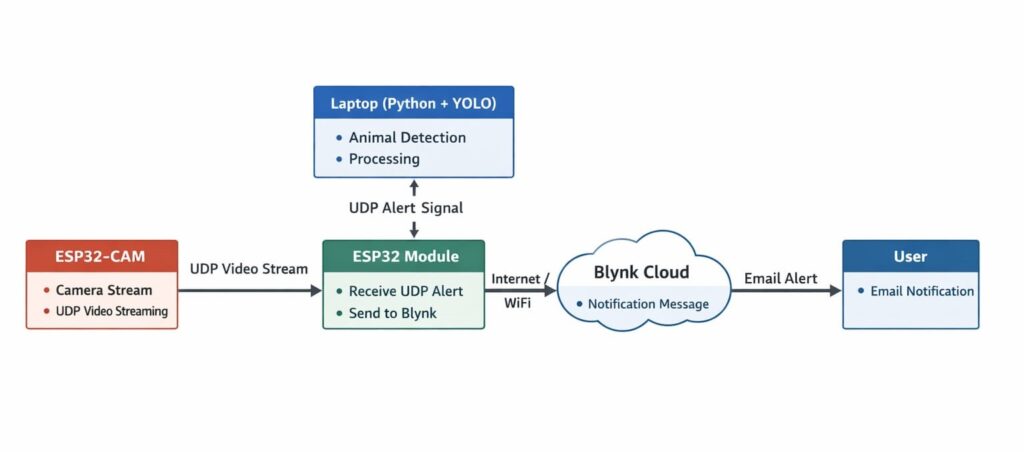
By integrating YOLO with cameras and embedded systems, this project can automatically detect animals and trigger alerts like alarms, notifications, or automated preventive actions. This makes it highly useful for smart farming, wildlife monitoring, and road safety applications.
In this project:
- A camera captures real-time images.
- YOLO model processes the image.
- If an animal (dog, cow, elephant, etc.) is detected:
- Alert is triggered (LED/Buzzer).
- An optional notification is sent.
- An image can be stored for record.
What is YOLO?
YOLO (You Only Look Once) is a fast and accurate object detection algorithm that :
Detects objects in real-time
Identifies multiple objects simultaneously
Provides bounding boxes and class labels
Works efficiently on GPUs and even edge devices
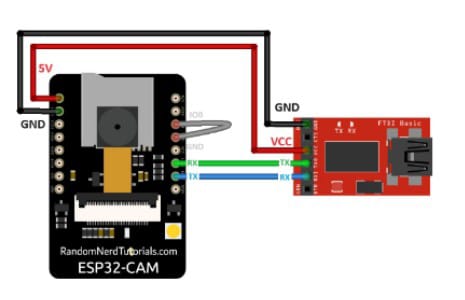
CIRCUIT DIAGRAM
Applications :
- Farm crop protection
- Forest wildlife monitoring
- Smart highway animal alert system
- Zoo surveillance
- Border security
- Smart villages
Components Required :
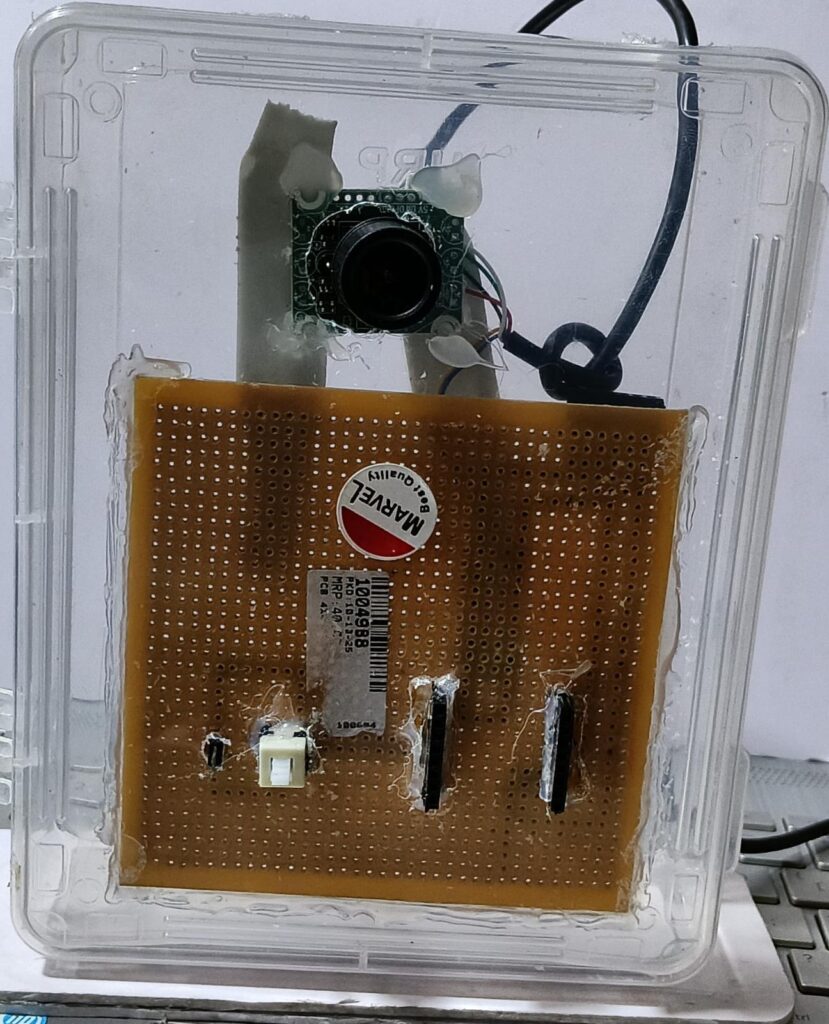
- ESP32-CAM / USB Camera
- Raspberry Pi / Laptop / PC (for running YOLO)
- Buzzer
- LED
- 220Ω Resistor
- Jumper wires
- Power supply (5V)
- Internet (optional for alerts)
Connection Description (Wiring Map)
Using ESP32-CAM + Laptop (Recommended for Beginners) :
ESP32-CAM Pin | Connection |
5V | 5V Power Supply |
GND | GND |
U0R | FTDI TX |
U0T | FTDI RX |
GPIO 4 | LED (+) |
GPIO 12 | Buzzer (+) |
GND | LED (-), Buzzer (-) |
Testing the Hardware :
Step 1: Power ON
- Ensure the ESP32-CAM or Raspberry Pi is powered properly.
- Check the camera LED indicator.
Step 2: Run Python Program
- Open a terminal.
- Execute detection script.
- The webcam preview window should open.
Step 3: Test with Images
- Show animal images from a mobile.
- Observe the bounding box around the detected animal.
- LED/Buzzer should activate (if programmed).
Step 4: Outdoor Testing
- Place the system near the farm area.
- Check detection range (5–15 meters recommended).
Working Principle :
- Camera module captures real-time environmental video.
- Video stream is divided into individual image frames.
- Each frame is resized for YOLO input processing.
- Frames are passed into the YOLO neural network.
- YOLO extracts important visual features from the frame.
- The model compares detected features with trained animal datasets.
- Animals such as dogs, cats, cows, birds, or monkeys are identified.
- Bounding boxes are generated around detected animals.
- Confidence scores are calculated for each detected object.
- Non-Maximum Suppression removes duplicate detections.
- Animal labels are displayed with confidence percentages.
- If confidence exceeds the preset threshold, detection is validated.
- Detection data is sent to the microcontroller/system controller.
- LED indicator turns ON for visual warning.
- Buzzer activates for audible alert notification.
- LCD/OLED display shows detected animal information.
- Snapshot or video recording is stored automatically.
- Alert message is sent through Wi-Fi/Bluetooth/GSM module.
- Real-time monitoring helps prevent animal intrusion or accidents.
- System continuously repeats the detection cycle for live tracking.
Troubleshooting :
Issue | Cause | Solution |
Slow detection | No GPU | Use lighter YOLO model |
Wrong classification | Low lighting | Improve lighting |
No detection | Model not loaded | Check file path |
False positives | Threshold low | Increase confidence value |
Camera not working | Driver issue | Check camera connection |
Animal Detection Using YOLO is a computer vision-based system designed to identify and classify animals in real-time using deep learning techniques. The system utilizes a camera module to continuously capture live video footage, which is then processed by a microcomputer (such as Raspberry Pi) or a PC running the powerful YOLO (You Only Look Once) object detection algorithm.
Unlike traditional methods, YOLO processes the entire image in a single pass, making it extremely fast and suitable for real-time applications. The trained model can detect multiple types of animals simultaneously with high accuracy, even in complex environments such as forests or farmlands.
When an animal is detected, the system can automatically trigger various alert mechanisms such as buzzer sounds, LED indications, email notifications, or cloud-based data logging. It can also capture and store images or video clips for further analysis. Additionally, the system can be integrated with IoT platforms to enable remote monitoring and control through mobile devices or web dashboards.
This project is highly useful for applications like wildlife monitoring, farm and crop protection, forest border surveillance, and smart agriculture. It helps reduce human effort, prevent crop damage, and minimize human-animal conflicts. With further enhancements, the system can be trained to detect specific animal species, recognize behavior patterns, and even predict intrusion risks using advanced AI models.