
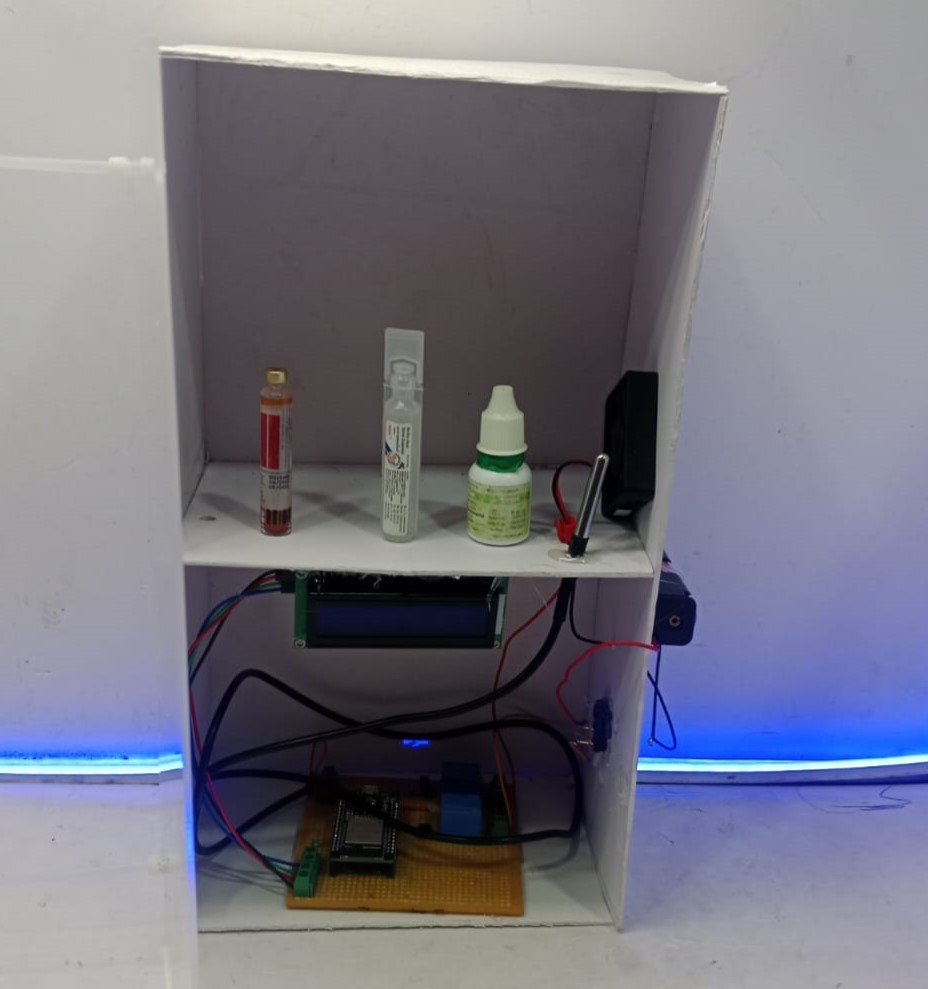
Medication mismanagement is a major cause of health complications, especially among elderly and visually impaired patients. Traditional medicine cabinets rely entirely on manual identification, which can lead to incorrect medicine intake and serious health risks.
In the field of Smart Health Care Robotic Projects, the Smart Medicine Cabinet stands out as an intelligent and practical solution. This system leverages computer vision technology to automate medicine identification and enhance patient safety.
The Smart Medicine Cabinet solves this problem by :
- Automatically identifying medicine type using computer vision
- Providing feedback through display or audio assistance
- Improving medication safety and organization
This makes it highly beneficial for home healthcare, hospitals, and assisted living environments.
The system is intentionally limited to detecting :
- Bacillus Clausii Spores Suspension
- Insulin (vial or pen)
- Eye Drops
( This controlled scope improves detection accuracy and system reliability, ensuring consistent performance in real-world usage. )
System Components
Hardware Components :
- ESP32 / ESP32-CAM
- Camera Module
- Medicine Cabinet (Compartments)
- Speaker / Buzzer (Audio Feedback)
- OLED / LCD Display (Optional)
- LED Indicators
Power Supply (5V / Battery)
Software Components :
- Python
- OpenCV
- Akaze Algorithm / YOLO (trained model)
- ESP32 Firmware
- Serial / Wi-Fi Communication
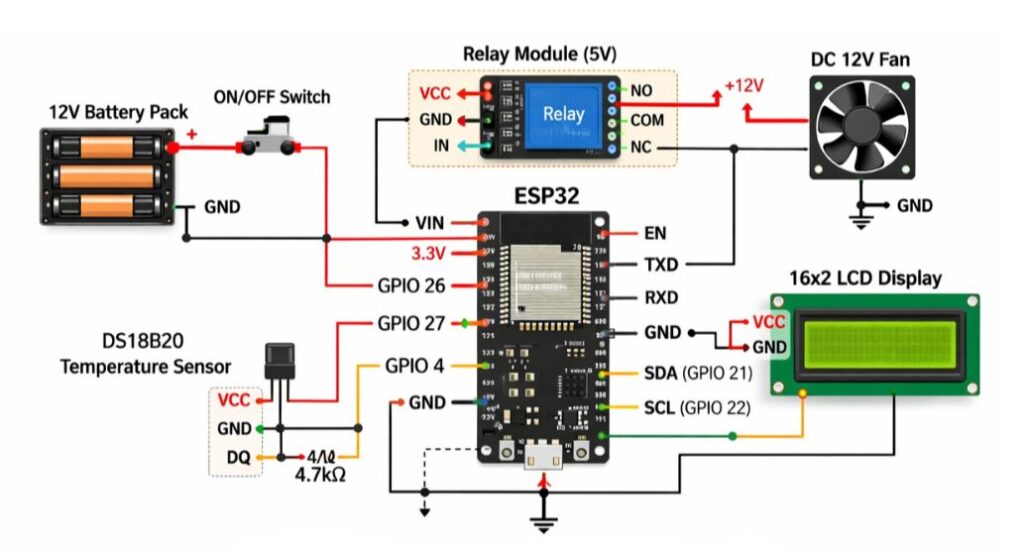
CIRCUIT DIAGRAM
Applications :
- Smart homes for elderly care
- Hospitals and clinics
- Assisted living centers
- Medicine safety systems
- Healthcare automation projects
Medicine Categories Detected :
Category | Description |
Bacillus Clausii Spores Suspension | Clear liquid vial with white cap |
Insulin | Insulin vial or insulin pen |
Eye Drops | Small dropper bottles |
( Other medicines are intentionally ignored to avoid false detection. )
Advantages :
- Reduces medication errors
- Simple and user-friendly
- Limited detection improves accuracy
- Cost-effective system
- Supports visually impaired users
Connection Description (Wiring Map) :
Component | Connection | Description |
Camera | ESP32-CAM | Captures medicine image |
Speaker | GPIO Pin | Audio output |
Display | I2C Pins | Shows detected medicine |
LED | GPIO | Status indication |
Power | 5V / GND | System power |
Wi-Fi | ESP32 | Communication with the Python system |
Working Principle :
Image Capture
- When a medicine is placed in front of the camera, an image is captured.
Computer Vision Processing
- Image is processed using OpenCV.
- Trained model (YOLO / CNN) classifies the object as:
- Bacillus Clausii Spores Suspension
- Insulin
- Eye Drop
Decision Logic
- If medicine belongs to the allowed categories → accepted
- If unknown → ignored or a warning given
User Feedback
- Audio: “Insulin detected”, etc.
- Display: Medicine type shown on screen
- LED indication for confirmation
Optional Storage Action
- Cabinet opens the correct compartment (future enhancement)
Testing the Hardware and Software
Camera Test :
- Verify image clarity and focus.
- Test under different lighting conditions.
Model Test
- Test with sample medicines.
- Check accuracy for each category.
Communication Test
- Verify data transfer between the Python system and the ESP32.
Full System Test
- Place each medicine type and confirm correct identification.
( Test rejection of unknown objects. )
Troubleshooting :
Issue | Cause | Solution |
Wrong detection | Poor lighting | Improve lighting |
Camera not working | Power issue | Check voltage |
Audio not playing | Speaker wiring | Check the GPIO pin |
False positives | Model confusion | Retrain with a better dataset |
ESP32 resets | Power drop | Use a stable supply |
( The Smart Medicine Cabinet with Computer Vision is an intelligent healthcare system designed to automatically identify and manage medicines using a camera and advanced image processing techniques. The system is specifically trained to detect three types of medicines — insulin vials, Bacillus clausii spores suspension, and eye drops — ensuring accurate and reliable recognition.
The system uses a camera module to capture real-time images of the medicine placed inside the cabinet. These images are processed using computer vision algorithms, often powered by deep learning frameworks like OpenCV and TensorFlow, to identify the medicine based on its shape, label, or packaging. A microcontroller or microcomputer (such as Arduino or Raspberry Pi) controls the overall operation of the cabinet.
Once a medicine is identified, the system provides immediate feedback through audio alerts or a display screen, helping users confirm the correct medication before use. It can also be extended to include features such as dosage reminders, expiry date alerts, and logging of medicine usage. This significantly reduces the risk of medication errors, especially for elderly individuals, visually impaired users, or patients managing multiple prescriptions.
Additionally, the system can be integrated with IoT platforms for remote monitoring, allowing caregivers or family members to track medication usage in real time. With further improvements, the cabinet can support more types of medicines, multilingual voice assistance, and mobile app connectivity.
This project is particularly useful in homes, hospitals, and healthcare facilities, offering a smart and reliable solution for safe and efficient medicine management. )