
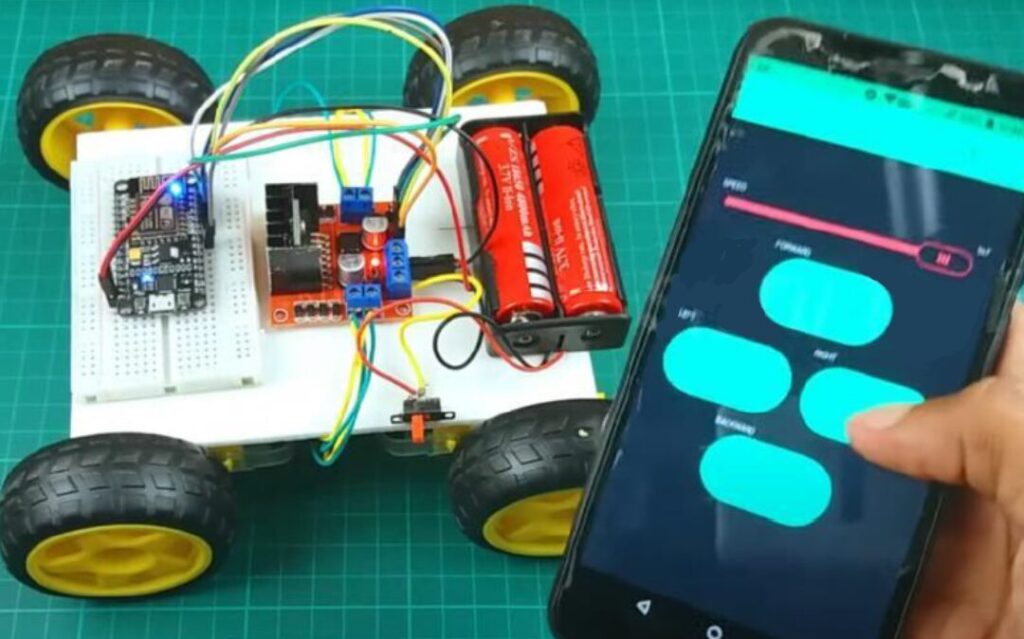
Remote robot control is essential in modern automation, surveillance, and industrial applications. Unlike Bluetooth-based systems with limited range, Wi-Fi-based control enables long-distance operation through the internet.
In this project :
- A Wi-Fi-enabled microcontroller connects to the internet.
- The Blynk mobile app sends control commands.
- The robot responds instantly to user inputs.
Key Features :
- Control robot using smartphone over Wi-Fi
- User-friendly Blynk mobile interface
- Real-time response
Suitable for IoT-based automation projects
Connection Description (Wiring Map)
Main Components :
- Microcontroller: ESP8266 (NodeMCU) / ESP32
- Motor Driver: L298N / L293D
- DC Motors & Chassis
- Blynk Mobile App
- Power Supply: Battery pack (7.4V / 12V)
Applications :
- Remote surveillance robots
- IoT-based robotic control
- Industrial automation prototypes
Educational IoT projects
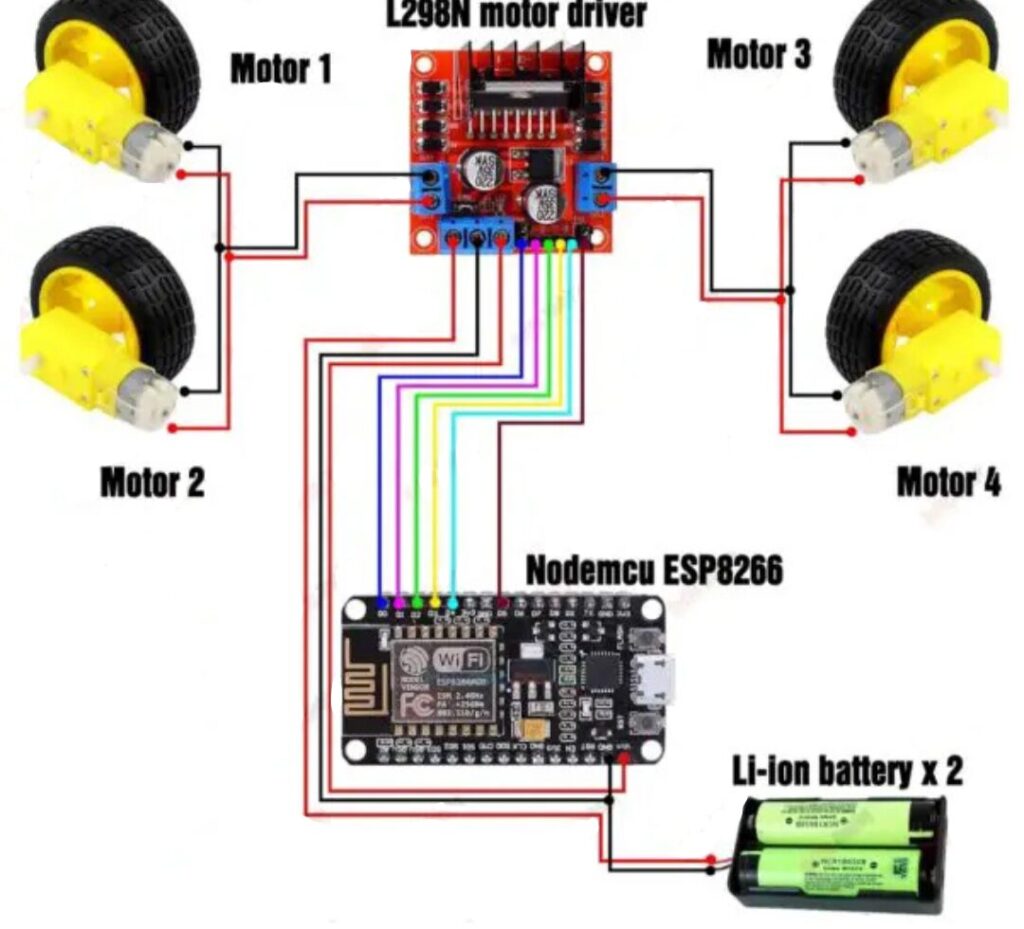
CIRCUIT DIAGRAM
Wiring Summary (Using NodeMCU ESP8266) :
Component | NodeMCU Pin | Description |
Motor Driver IN1 | D1 | Left motor control |
Motor Driver IN2 | D2 | Left motor control |
Motor Driver IN3 | D3 | Right motor control |
Motor Driver IN4 | D4 | Right motor control |
Motor Driver ENA/ENB | Jumper / PWM | Speed control |
NodeMCU GND | GND | Common ground |
NodeMCU Vin | Battery + | Power input |
Motor Connection:
- Left motor → OUT1 & OUT2
Right motor → OUT3 & OUT4
Working Principle :
- NodeMCU/ESP32 connects to Wi-Fi network.
- Blynk app sends control signals when buttons are pressed.
- Microcontroller receives commands via Blynk cloud.
- Commands activate motor driver pins.
- Robot moves forward, backward, left, right, or stops.
Testing the Hardware:
- Wi-Fi Test
- Verify Wi-Fi connection status in Serial Monitor.
- Verify Wi-Fi connection status in Serial Monitor.
- Blynk App Test
- Press virtual buttons and check signal response.
- Press virtual buttons and check signal response.
- Motor Test
- Run motors individually.
- Run motors individually.
- Full System Test
- Control robot using Blynk app.
Troubleshooting :
Issue | Possible Cause | Solution |
Robot not responding | Wrong Blynk token | Check authentication token |
Wi-Fi not connecting | Wrong SSID/password | Verify Wi-Fi credentials |
Motors not moving | Power supply issue | Use separate motor battery |
Delay in control | Weak internet | Improve network signal |
Board resets | Voltage drop | Use regulated supply |
( The Wi-Fi Controlled Robot with Blynk App is a smart robotic system that can be controlled remotely over the internet using a smartphone. The Blynk IoT platform provides a user-friendly mobile interface, allowing real-time robot navigation from anywhere within the Wi-Fi network range. This project demonstrates the integration of IoT, wireless communication, and robotics. )