
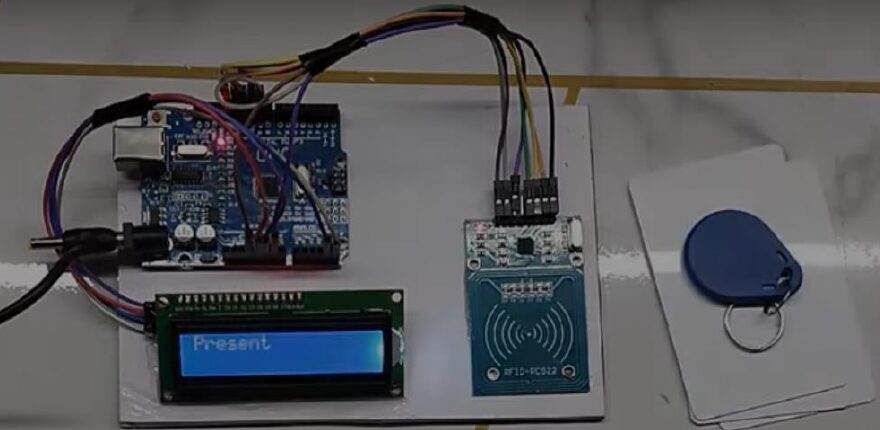
Traditional attendance systems require manual record-keeping, which is time-consuming and prone to errors. The RFID Attendance System automates this process by detecting RFID cards held by users and logging attendance electronically.
Key Features :
- Uses RFID tags/cards to uniquely identify each person.
- Logs attendance automatically in a database or displays it on an LCD.
- Can store data for multiple users.
- Reduces errors, saves time, and improves record management.
This project combines RFID technology, microcontroller interfacing, and data logging for an efficient attendance management system.
Connection Description (Wiring Map)
Main Components :
- Microcontroller: Arduino Uno / ESP32
- RFID Reader (RC522 / similar): Reads RFID tags/cards
- RFID Tags/Cards: Unique identification for each user
- LCD Display (16×2 or OLED): Displays attendance confirmation
- Buzzer / LED (Optional): Provides alert on successful scan
Power Supply: 5V regulated DC
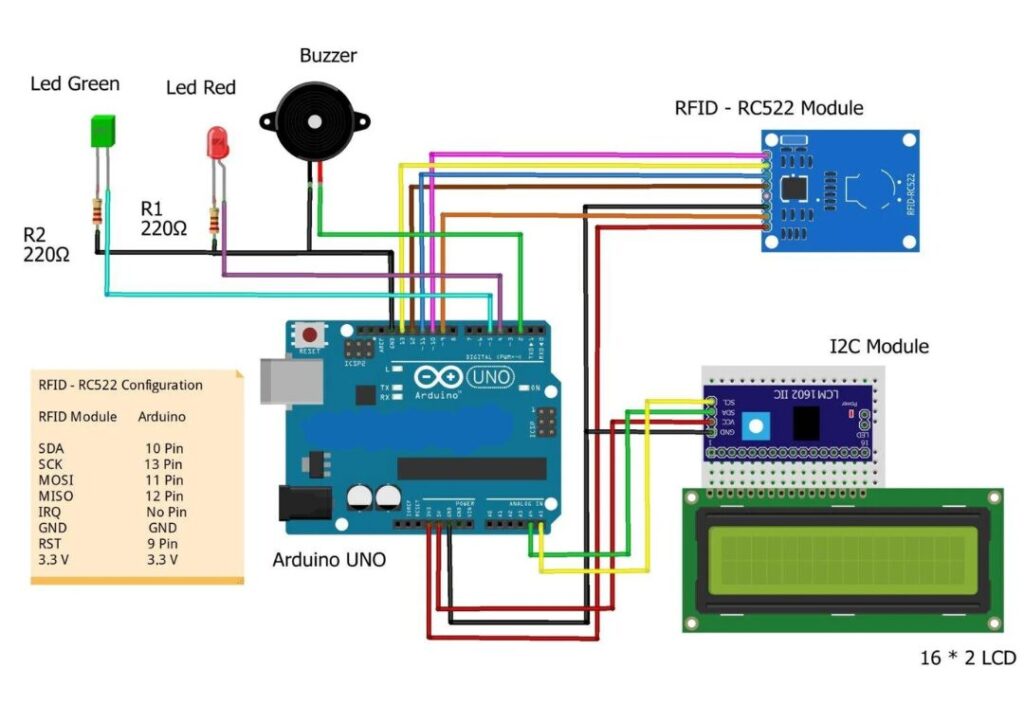
CIRCUIT DIAGRAM
Wiring Summary :
Component | Arduino Pin | Connection Notes |
RFID Reader RC522 | SDA → D10, SCK → D13, MOSI → D11, MISO → D12, RST → D9 | SPI communication with Arduino |
LCD Display | D2-D7 | Data pins; I2C variant optional |
Buzzer / LED | D8 | Optional feedback for scan confirmation |
Power Supply | 5V & GND | Powers Arduino, RFID reader, and peripherals |
Visual Wiring Map (Simplified) :
- RFID Reader connected to Arduino via SPI (SDA, SCK, MOSI, MISO, RST)
- LCD connected for attendance feedback
- Optional buzzer or LED connected to digital output pin
( Arduino powered via regulated 5V supply )
Testing the Hardware :
- RFID Reader Test: Scan an RFID card/tag and verify that Arduino detects its unique ID.
- LCD Display Test: Display the scanned ID or user name on the LCD.
- Buzzer/LED Test (Optional): Trigger feedback on successful scan.
- Integration Test: Scan multiple RFID cards and ensure correct logging and display of attendance.
Troubleshooting :
Problem | Possible Cause | Solution |
RFID reader not detecting card | Incorrect wiring or SPI pins mismatch | Check SPI connections and pin configuration |
LCD not displaying data | Wiring or initialization issue | Verify LCD connections and code initialization |
Buzzer/LED not working | Pin connection or insufficient current | Check wiring, use transistor if needed |
Arduino not powered properly | Low voltage or unstable supply | Use regulated 5V supply |
Duplicate entries | Code logic issue | Implement proper ID checking and timestamp logging |
( The RFID Attendance System is an automated method for recording attendance using Radio Frequency Identification (RFID) technology. Instead of manually marking attendance, this system identifies individuals through RFID tags/cards and logs their entry in a database or display. This technology is widely used in schools, offices, and organizations to streamline attendance management, reduce human error, and save time. )