
Traditional robot control methods such as switches and joysticks require physical effort and limit natural interaction. Gesture-based control offers a more intuitive and human-friendly interface.
In this project :
- MPU6050 sensor detects hand tilt and motion.
- Microcontroller processes sensor data.
- Robot motors move according to detected gestures.
Key Features :
- Natural hand movement–based control
- High accuracy using accelerometer & gyroscope
- Wireless control (using RF/Bluetooth, optional)
- Ideal for assistive and robotic applications
This project demonstrates the integration of motion sensing and robotics.
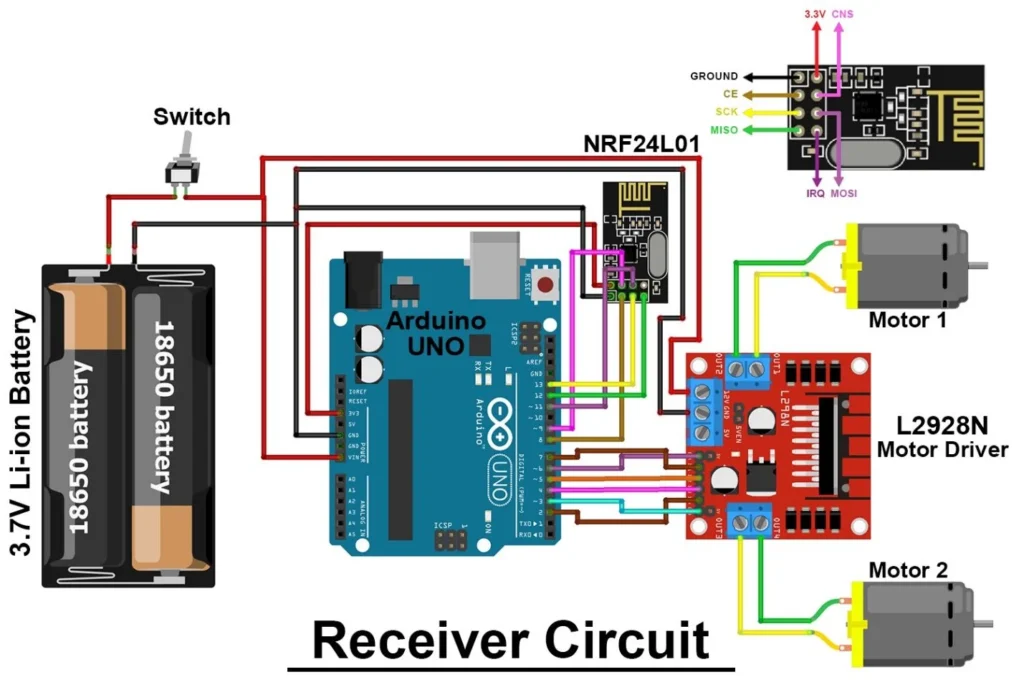
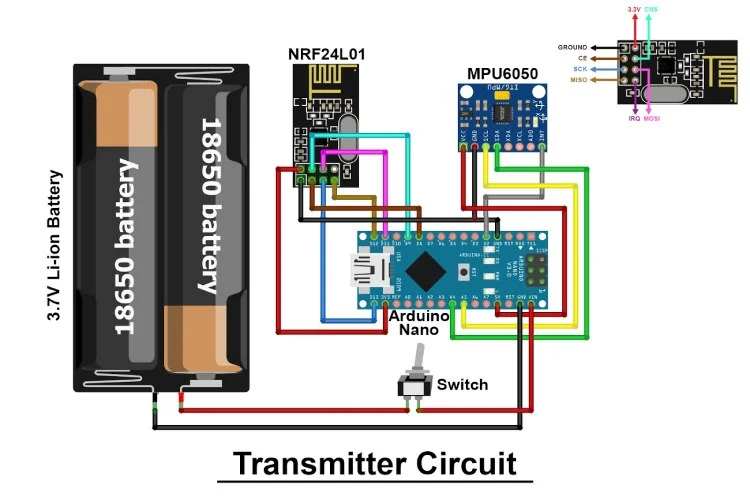
Connection Description (Wiring Map)
Main Components :
- Microcontroller: Arduino Uno / Nano
- MPU6050 Sensor Module
- Motor Driver: L298N / L293D
- DC Motors & Chassis
- Wireless Module: Bluetooth HC-05 / RF (Optional)
Power Supply: Battery pack
Wiring Summary
MPU6050 Connections (I2C Communication) :
MPU6050 Pin | Arduino Pin | Description |
VCC | 5V | Power supply |
GND | GND | Ground |
SDA | A4 | I2C data |
SCL | A5 | I2C clock |
Motor Driver Connections :
Motor Driver Pin | Arduino Pin | Description |
IN1 | D4 | Left motor control |
IN2 | D5 | Left motor control |
IN3 | D6 | Right motor control |
IN4 | D7 | Right motor control |
ENA/ENB | PWM / Jumper | Speed control |
Working Principle :
- MPU6050 senses hand tilt in X and Y directions.
- Arduino reads accelerometer and gyroscope values via I2C.
- Gesture mapping:
- Tilt forward → Robot moves forward
- Tilt backward → Robot moves backward
- Tilt left → Robot turns left
- Tilt right → Robot turns right
- Flat position → Robot stops
- Tilt forward → Robot moves forward
- Arduino sends commands to motor driver.
- Motors move the robot accordingly.
Testing the Hardware :
- MPU6050 Sensor Test
- Read tilt values using Serial Monitor.
- Verify change in values when sensor is tilted.
- Read tilt values using Serial Monitor.
- Motor Test
- Test motors individually using motor driver.
- Test motors individually using motor driver.
- Gesture Test
- Tilt MPU6050 in different directions.
- Observe corresponding robot movements.
- Tilt MPU6050 in different directions.
- Full System Test
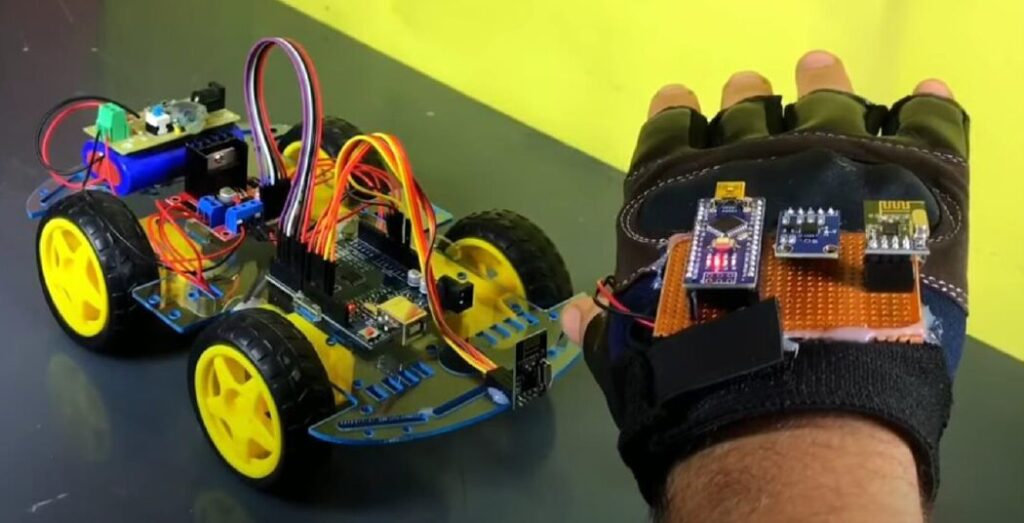
- Mount MPU6050 on glove or handheld board.
- Control robot using hand gestures.
- Mount MPU6050 on glove or handheld board.
Applications :
- Assistive robotics
- Wheelchair control systems
- Industrial robot control
- Gaming and VR interfaces
- Defense and rescue robots
Troubleshooting :
Problem | Possible Cause | Solution |
MPU6050 not detected | I2C wiring issue | Check SDA/SCL connections |
Robot moves incorrectly | Wrong gesture mapping | Adjust threshold values |
Robot not moving | Motor driver issue | Verify motor power supply |
Erratic movement | Sensor noise | Use filtering in code |
Arduino resets | Power drop | Use separate motor battery |
( A Gesture Controlled Robot is a robotic system that moves according to human hand gestures instead of traditional buttons or joysticks. This project uses the MPU6050 accelerometer and gyroscope sensor to detect hand movements and transmit them to a robot for motion control. It provides an intuitive and wireless method of robot navigation, making it useful in robotics, healthcare, and industrial applications. )