
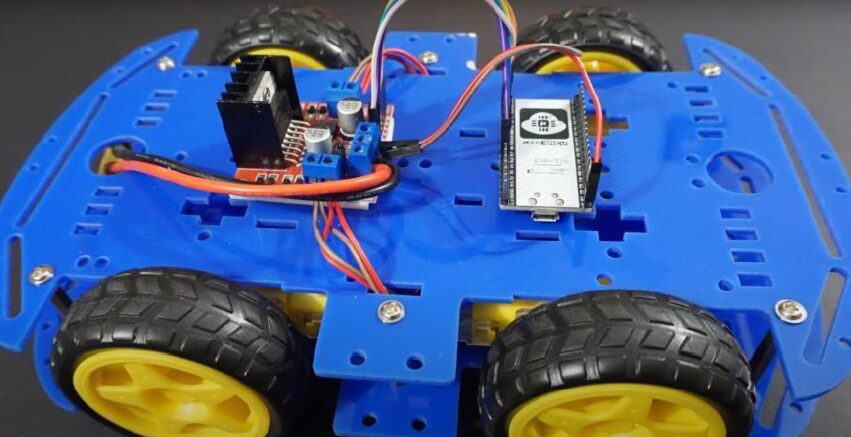
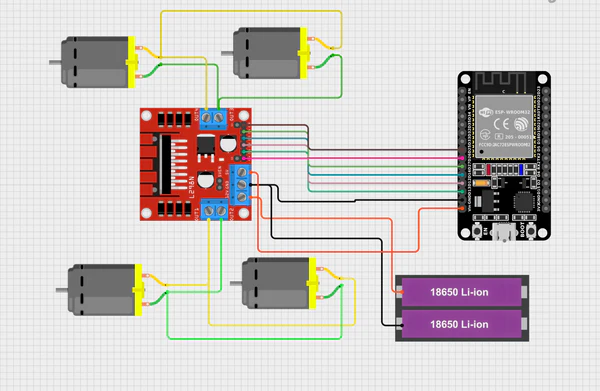
CIRCUIT DIAGRAM
Wireless control plays an important role in modern robotics, enabling flexible and efficient interaction between humans and machines. Bluetooth technology provides a simple, low-cost, and reliable solution for short-range communication.
As part of Smart Servo Robot Projects, the Bluetooth Controlled Robot allows users to operate a robotic system using a smartphone as a remote controller. Commands such as forward, backward, left, right, and stop are sent from a mobile application to the robot via Bluetooth communication.
The microcontroller receives these commands and processes them to control the motors through a motor driver module, ensuring smooth and accurate movement of the robot.
Key Features :
Wireless control using Bluetooth
Mobile phone–based operation
Simple and user-friendly interface
Low cost and easy to implement
This project is ideal for beginners learning robotics and wireless communication.
Connection Description (Wiring Map)
Main Components :
- Microcontroller: Arduino Uno / Nano / ESP32
- Bluetooth Module: HC-05 / HC-06
- Motor Driver: L298N / L293D
- DC Motors: For robot movement
- Chassis & Wheels
- Power Supply: Battery (9V / 12V / Li-ion)
Wiring Summary
Component | Arduino Pin | Description |
Bluetooth TX | D2 | Connected to Arduino RX (Software Serial) |
Bluetooth RX | D3 | Connected to Arduino TX (via voltage divider) |
Motor Driver IN1 | D4 | Left motor control |
Motor Driver IN2 | D5 | Left motor control |
Motor Driver IN3 | D6 | Right motor control |
Motor Driver IN4 | D7 | Right motor control |
Motor Driver ENA/ENB | Jumper / PWM pins | Motor speed control |
Motor Driver VCC | Battery + | Motor power |
Arduino VCC | 5V | Logic power |
Common GND | GND | Shared ground |
Motor Connection:
Left motor → Motor driver OUT1 & OUT2
Right motor → Motor driver OUT3 & OUT4
Working Principle
Mobile app sends control commands via Bluetooth.
Bluetooth module receives data and sends it to Arduino through serial communication.
Arduino interprets commands (F, B, L, R, S).
Motor driver activates motors accordingly.
Robot moves in the desired direction.
Testing the Hardware
Bluetooth Test
Pair mobile phone with HC-05 module
Check LED status for successful pairing
Motor Driver Test
Run motors individually to verify direction and speed
Command Test
Send commands from mobile app
Observe robot response for each command
Full System Test
( Control robot movement wirelessly using phone )
Applications :
Educational robotics
Surveillance robots (with upgrades)
Home automation control
Remote-controlled vehicles
Troubleshooting
Problem | Possible Cause | Solution |
Bluetooth not pairing | Wrong password or power issue | Check default password (1234/0000) |
Robot not moving | Motor driver wiring issue | Verify motor and driver connections |
Erratic movement | Weak battery | Recharge or replace battery |
Bluetooth disconnected | Out of range | Keep within 10 meters |
Motors rotate wrong direction | Polarity reversed | Swap motor wires |
( A Bluetooth Controlled Robot is a wireless robotic system that can be controlled using a mobile phone through Bluetooth communication. The robot receives commands from a mobile application and moves accordingly. This project demonstrates wireless control, embedded systems, and basic robotics concepts. It is widely used for learning automation, robotics, and short-range wireless communication. )