
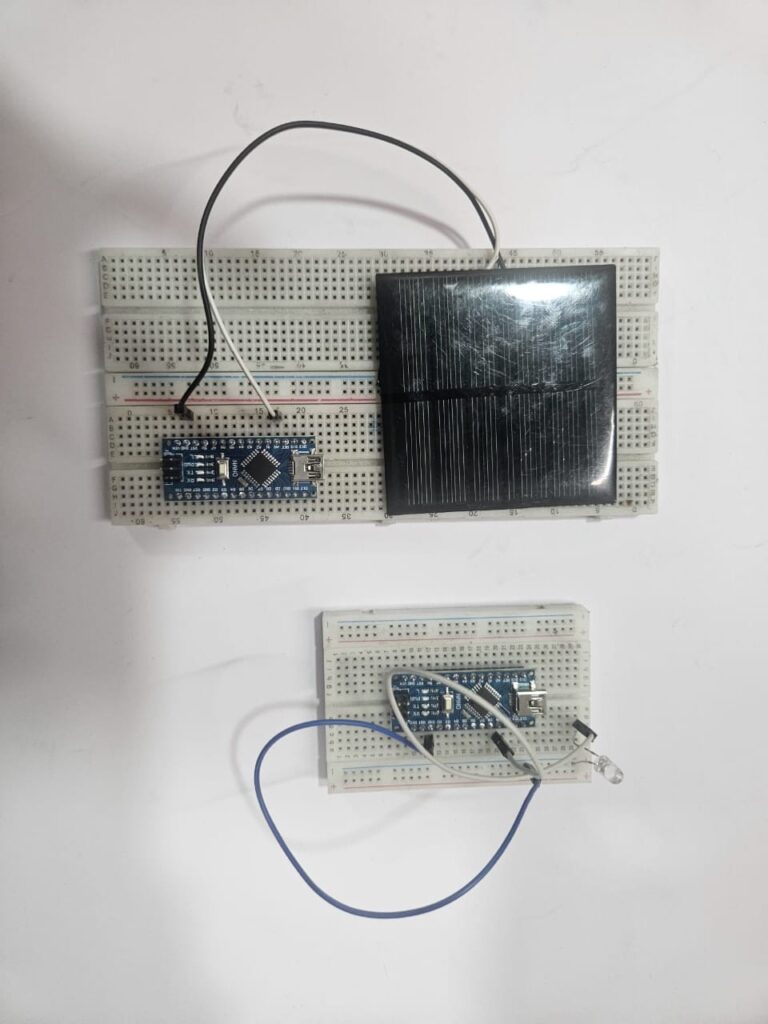
As part of innovative Smart LI-FI Project Ideas, this experiment explores Li-Fi technology, which is based on the principle of Visible Light Communication (VLC), where variations in light intensity represent binary data. Unlike Wi-Fi, which relies on radio frequency signals, Li-Fi uses the visible light spectrum, offering a high-speed, secure, and cost-effective method for wireless data transmission.
In this project, the transmitter Arduino reads a message from the Serial input and converts it into binary pulses. An LED then switches ON and OFF at high speed to transmit the 1s and 0s through light signals. On the receiving end, a solar panel or LDR (Light Dependent Resistor) detects these light variations. The receiver Arduino processes the incoming signals, converts them back into readable characters, and displays the message on the Serial Monitor.
This project is a great example within Smart LI-FI Project Ideas, demonstrating how microcontrollers can be used to implement advanced communication systems. It helps learners understand optical wireless communication, embedded systems, and real-time data transmission concepts, making it ideal for students, hobbyists, and researchers exploring next-generation technologies.
Components Required :
Component | Quantity | Description |
Arduino Uno / Nano | 2 | One for transmitter, one for receiver |
LED (White or IR) | 1 | For transmitting data via light |
Resistor 220 Ω | 1 | Limits current through LED |
Solar panel or LDR | 1 | Detects transmitted light |
Jumper wires | – | For connections |
Breadboard | 1 | For easy wiring |
USB cables | 2 | For programming and Serial communication |
Circuit Description :
Transmitter Side
- The LED anode is connected to Arduino pin 9 through a 220 Ω resistor.
- The LED cathode is connected to GND.
- Arduino sends ON/OFF pulses to represent the binary data of characters typed in the Serial Monitor.
Receiver Side
- Solar panel +ve (or LDR output node) connected to A0 (analog input).
- Solar panel –ve connected to GND.
- Arduino continuously reads analog values from A0, detects changes in light intensity, and reconstructs the transmitted character.
Tip: Keep the LED and solar panel aligned directly facing each other at a 5–10 cm distance for best performance.
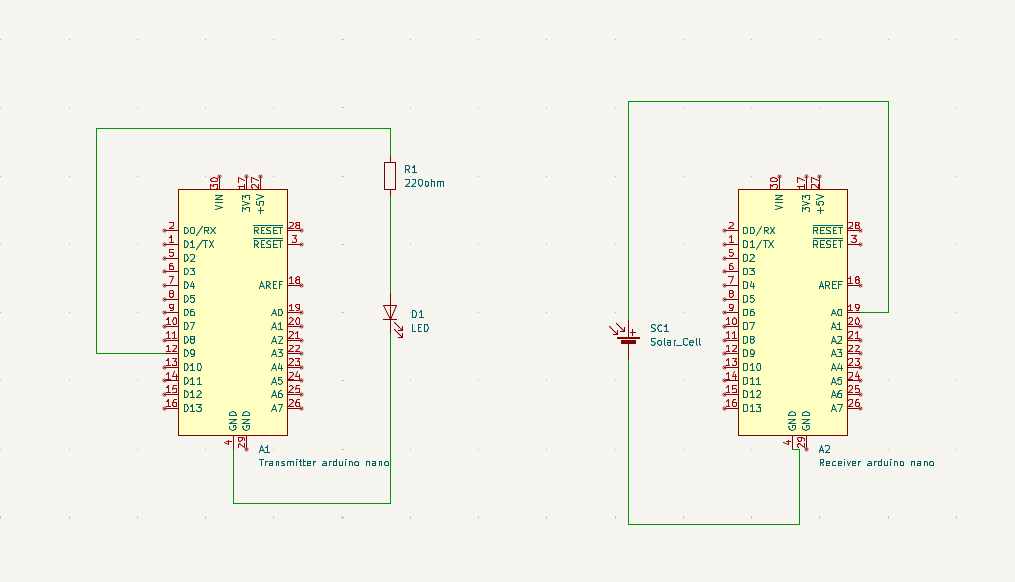
CIRCUIT DIAGRAM
Testing the Hardware :
- Step 1 – Test LED Output:
Upload a simple LED blink code to confirm the LED turns ON and OFF properly. - Step 2 – Test Receiver Response:
Upload a small analog read code to check if the receiver (solar panel/LDR) values change when LED blinks. - Step 3 – Align Components:
- Keep LED directly facing the solar panel/LDR.
- Reduce ambient light for stable readings.
- Step 4 – Upload Final Transmitter and Receiver Codes
- Open both Serial Monitors at 9600 baud.
- Type text (e.g., HELLO#) in the transmitter Serial Monitor.
- The receiver should print the same text.
Troubleshooting Guide :
Problem | Possible Cause | Solution |
No data received | LED not connected or misaligned | Check LED wiring and polarity |
Garbled characters (⸮X⸮-) | Timing mismatch | Increase BIT_DELAY to 10–15 ms in both codes |
Receiver shows no light variation | Weak LED or too far distance | Use a brighter LED, reduce distance |
Receiver always shows same value | Solar panel/LDR not facing LED | Adjust alignment or use shield to block other light |
Works in dark but not in bright light | Ambient light interference | Use black tube or cover around LED and receiver to isolate path |
Receiver unstable | Noise in analog readings | Use averaging or add 10 kΩ resistor parallel to sensor |
( This project demonstrates a simple Li-Fi (Light Fidelity) communication system using Arduino, offering an exciting introduction to the world of optical wireless communication. Li-Fi is a form of wireless data transfer that uses visible light instead of traditional radio waves like Wi-Fi, making it faster, more secure, and less prone to electromagnetic interference.
In this setup, one Arduino board acts as the transmitter, converting digital data into rapid LED blinks that represent binary signals (1s and 0s). A solar panel or LDR (Light Dependent Resistor) serves as the receiver, detecting these changes in light intensity and converting them back into electrical signals. The receiving Arduino processes these signals and reconstructs the transmitted message for display on the Serial Monitor.
This project not only highlights the concept of short-distance, secure, and interference-free communication but also demonstrates how Arduino-based systems can be used to explore cutting-edge technologies. It’s an excellent choice for students, hobbyists, and makers interested in learning about Arduino Robot Projects, data transmission principles, and the future of light-based networking in smart devices and IoT systems. )