
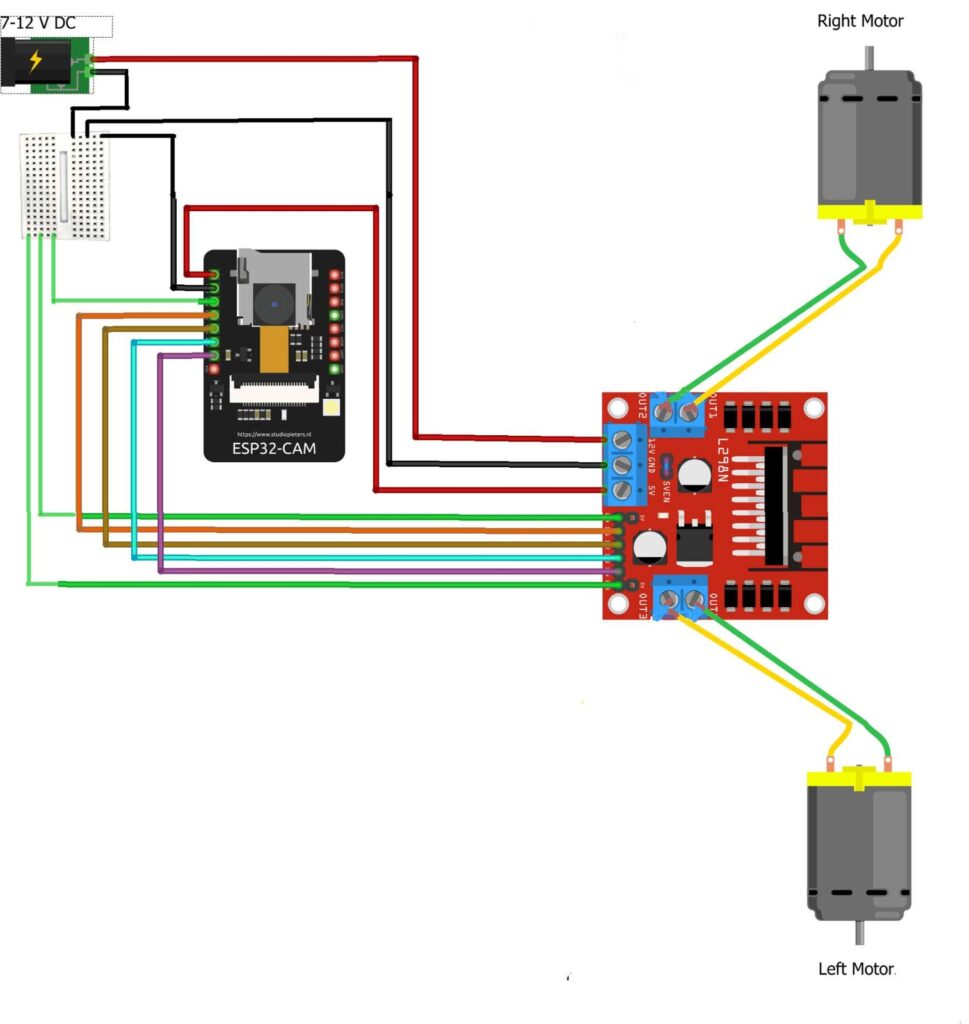
CIRCUIT DIAGRAM
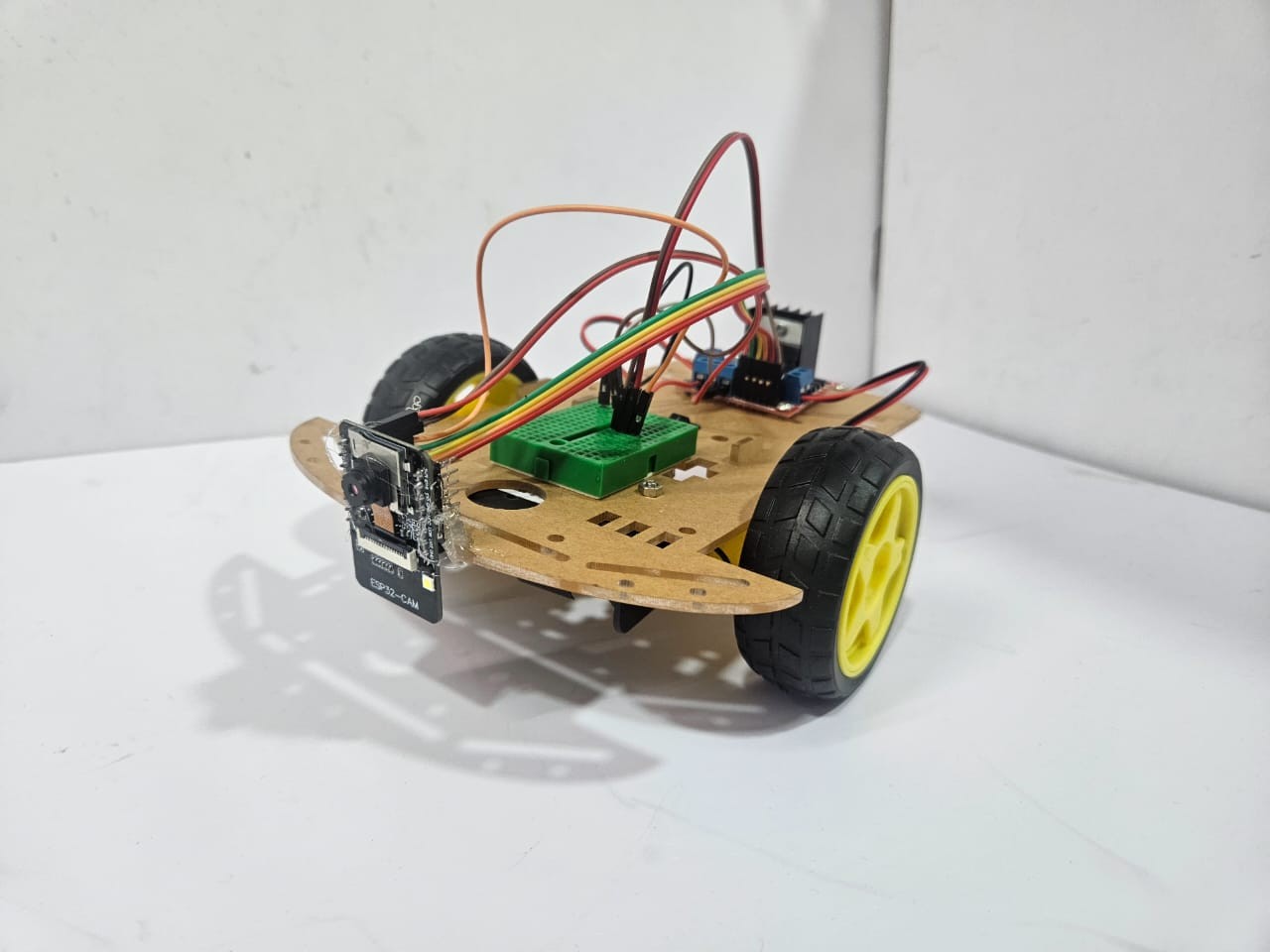
Among the most innovative Robotic Project Ideas, this project focuses on designing and implementing a motorized robotic car using the ESP32-CAM module. The ESP32-CAM acts as both the brain and eyes of the robot — controlling the motors for movement while simultaneously providing live video streaming for remote surveillance and operation.
The system utilizes an H-bridge motor driver to control two DC motors, enabling smooth forward and reverse motion. An LED headlight is also included to enhance visibility during low-light or night-time operation. This project highlights how camera-enabled microcontrollers like the ESP32-CAM can be leveraged for surveillance, automation, and robotics learning at a low cost.
As one of the most practical Robotic Project Ideas, it offers hands-on experience in IoT-based control, real-time monitoring, and wireless communication, making it an excellent choice for students, hobbyists, and anyone interested in exploring smart robotics systems.
Connection Description :
GPIO12 is connected to ENA and ENB on the motor driver to provide PWM speed control for both motor through a breadboard.
GPIO13 is connected to IN1 to control the right motor direction.
GPIO15 is connected to IN2 to control the right motor direction.
GPIO14 is connected to IN3 to control the left motor direction.
GPIO2 is connected to IN4 to control the left motor direction.
GPIO4 is connected to the LED headlight for light control.
The 5V pin is connected to the motor driver’s VCC (logic supply) to power the ESP32 logic.
The GND pin is connected to the motor driver’s ground to ensure a common ground.
An external 5–12V supply is connected to the motor driver’s motor power input to drive the motors.
Test the Hardware :
Upload the ESP32-CAM code that initializes PWM on GPIO12 and sets GPIO13, 15, 14, and 2 as motor direction outputs.
Connect the motor driver and verify the LED headlight control via GPIO4.
Power the circuit:
5V to ESP32-CAM (via USB or regulator).
5–12V external supply to motor power terminals.
Open the ESP32-CAM IP stream on your network to view the camera feed.
Send movement commands (forward, backward, left, right) and observe:
Right and left motors rotate accordingly.
Speed changes with PWM on GPIO12.
LED toggles when commanded.
Troubleshooting :
Issue | Possible Cause | Solution |
Motors not running | No common ground between ESP32-CAM and motor driver | Connect GND of both circuits together |
Motors only move in one direction | Incorrect GPIO wiring or direction logic | Check IN1–IN4 wiring and code logic |
ESP32-CAM resets during motor start | Power supply dip / insufficient current | Use separate 5V regulator for ESP32-CAM; ensure common ground |
LED not working | GPIO4 not configured as output | Check code and LED polarity |
Video feed not loading | Incorrect IP or Wi-Fi setup | Verify network connection and IP address |
Motors rotate slowly | Low supply voltage | Use ≥7V motor power or check battery charge |
( This project implements a motorized robotic car using the ESP32-CAM module for both control and monitoring. The ESP32-CAM not only drives the motors through an H-bridge motor driver but also provides camera-based vision, enabling remote operation and potential applications in surveillance and automation. Motor control is achieved by interfacing GPIO pins of the ESP32- CAM with the motor driver’s input channels, where GPIO12 provides PWM speed control, while GPIO13, GPIO15, GPIO14, and GPIO2 handle the directional control of the right and left motors. An LED headlight on GPIO4 offers illumination for low-light operation.
The system is powered by a 5V supply for logic and an external 5–12V source for motor driving, ensuring adequate power delivery. This integration of motor control with live video streaming through the ESP32-CAM makes the system cost-effective, compact, and versatile, suitable for robotics learning, remote monitoring, and smart vehicle applications. )