
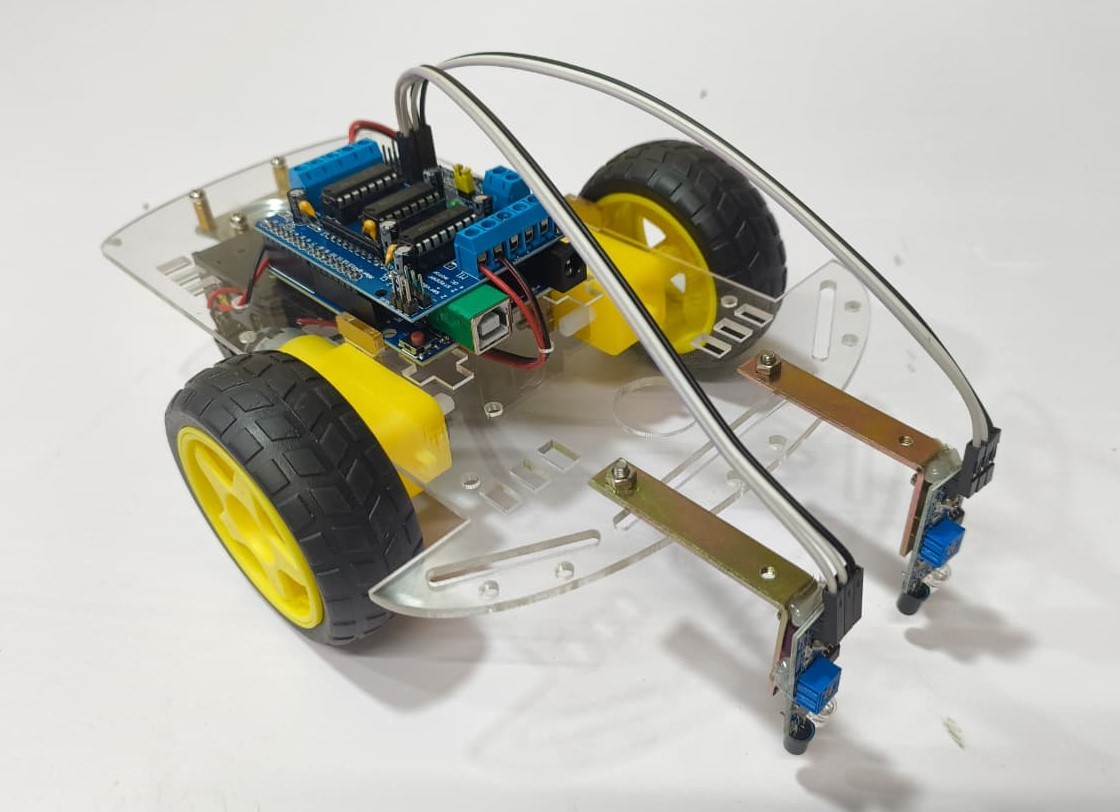
This project is a part of the exciting world of DIY Robots, featuring a simple yet effective line-following robot car that can automatically track a black line on a white surface. It uses two infrared (IR) sensors as its “eyes” to detect the line, while an Arduino paired with a motor driver shield (AFMotor) controls the movement of four DC motors with precision. The robot continuously adjusts its direction based on which sensor detects the line, allowing it to follow paths smoothly and accurately without any human intervention.
This DIY Robots project is an excellent way to learn about sensor-based navigation, motor control, and the fundamentals of automation in robotics. This DIY Robots project is not only a fun hands-on activity but also an excellent learning platform for understanding sensor-based navigation, motor control, and the fundamentals of autonomous robotics, making it perfect for students, hobbyists, and STEM learners eager to explore robotics innovation.
Connections Description (like wiring map) :
- Arduino + Motor Shield (AFMotor):
- Motor 1 → Front Left Wheel
- Motor 2 → Back Left Wheel
- Motor 3 → Front Right Wheel
- Motor 4 → Back Right Wheel
- Sensors:
- Left sensor → Arduino A0
- Right sensor → Arduino A1
- Sensor VCC → +5V on Arduino
- Sensor GND → GND on Arduino
- Power:
- Motors need a battery pack (usually 6–12V).
- Arduino gets power from the same battery (through the motor shield).
Test the Hardware :
- Place the robot on a black line over a white surface.
- Power on the system and ensure both sensors detect correctly (black = LOW / 0, white = HIGH / 1).
- Upload the Arduino program for line following.
- Test each condition:
- Both sensors detect black → robot moves forward.
- Left sensor detects black → robot turns left.
- Right sensor detects black → robot turns right.
- Both sensors detect white → robot stops.
- Adjust sensor sensitivity if needed (usually with a small potentiometer on each sensor).
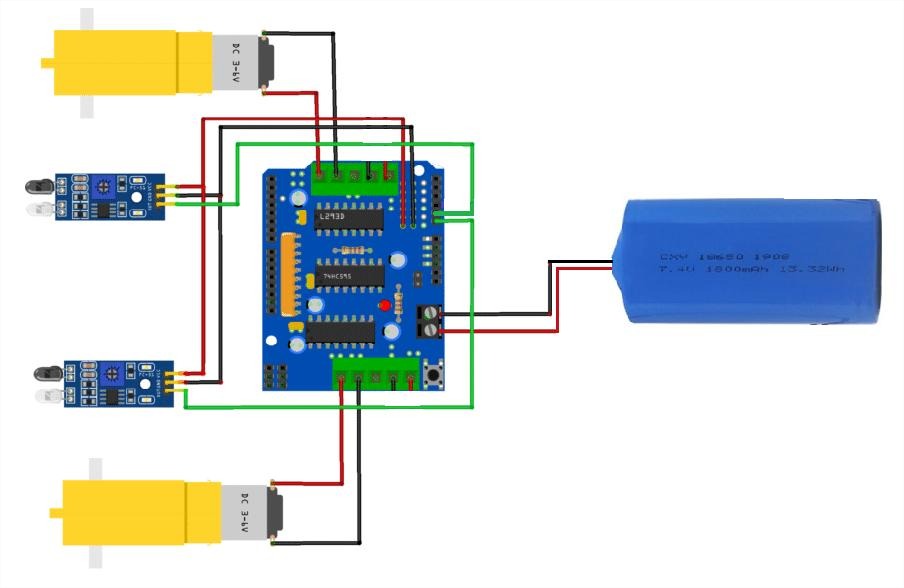
CIRCUIT DIAGRAM
Troubleshooting :
Problem | Possible Cause | Solution |
Robot doesn’t move | Power not connected or weak battery | Check battery and motor driver connections |
Robot turns the wrong way | Motor wiring swapped | Swap motor connections on shield |
Sensors always read same value | Poor sensor placement or faulty wiring | Check sensor position and adjust height (~1 cm above ground) |
Robot vibrates or moves jerkily | Uneven power or PWM signal noise | Use fully charged batteries and ensure solid connections |
Robot can’t detect the line | Line not dark enough / light interference | Use thick, dark black line and good lighting |
( This project is an engaging introduction to the world of DIY Robots, focusing on building a line-following robot car that can automatically track a black line on the ground. The system uses two infrared (IR) sensors as the robot’s eyes, which detect the contrast between the black line and the surrounding surface. These sensors send digital signals to an Arduino microcontroller equipped with a motor driver shield, which processes the input data and controls the robot’s movement accordingly.
Based on the sensor readings, the Arduino decides whether the robot should move forward, turn left, turn right, or stop to stay accurately on track. This setup allows the robot to follow paths smoothly without any human intervention. The DIY Robots project is simple, affordable, and highly educational, offering hands-on experience in sensor-based control, autonomous navigation, and robotics programming. It’s a great starting point for students and hobbyists who want to understand how real-world robots perceive and respond to their environment.
By combining simple electronics and logical programming, this DIY Robots project offers a fun, hands-on introduction to the core principles of autonomous navigation, sensor-based control, and robotic motion. It’s an excellent educational activity for beginners and students interested in learning how robots perceive their environment and make decisions — a foundational step toward more advanced robotics and automation systems. )